
One worklist of every contractor who needs something from you, in four blocks, worst at the top. If you only open one screen a week, open this one.
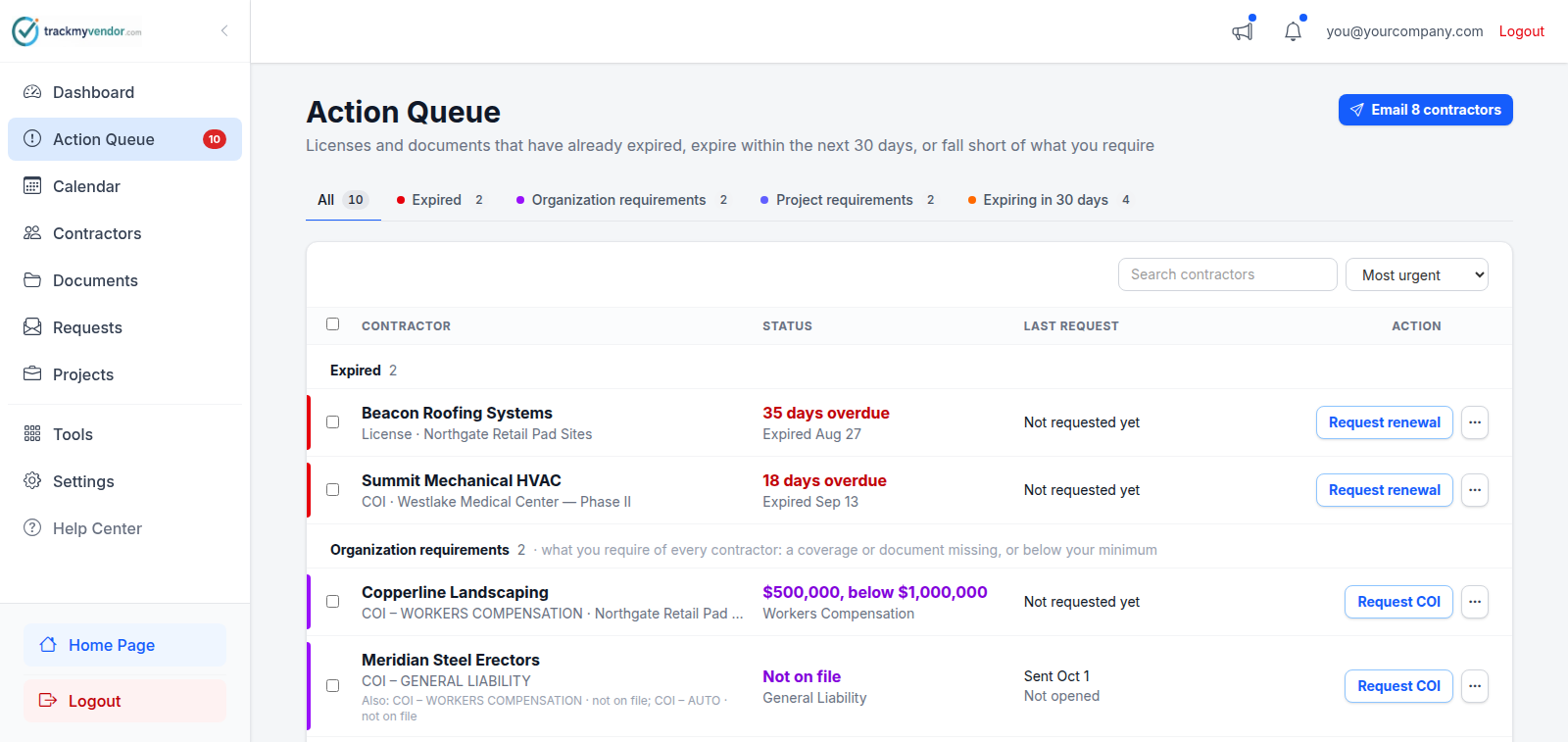
The blocks
Each item sits in the block that describes it, and a coloured stripe down the row's edge says which. A contractor with an expired license and a certificate lapsing next week has a row under Expired and another under Expiring in 30 days — nothing is folded into another block. When a block holds several items for the same contractor, they share one row, the extras listed under Also.
- Expired (red) — something has already lapsed. These are the ones making contractors Non-Compliant. Most overdue first.
- Organization requirements (purple) — what you require of every contractor: a coverage missing from every certificate or below your minimum, or a required document not on file. This is not a renewal: the certificate or document they need is a different one.
- Assignment requirements (indigo) — short of what one assignment asks for, over and above your own requirements. When you email the contractor, what's missing is listed with everything else — but the email never says which assignment it's for, since contractors aren't told which jobs they're on.
- Expiring in 30 days (orange) — still valid, lapsing within the next 30 days. Soonest first. Chase these and they never reach Expired.
- No response (grey) — nothing is expired, expiring or short, but a document request you sent has gone quiet for more than three days: never opened, or opened with nothing uploaded.
Thirty days is the whole window: a certificate lapsing in two months is not on this screen yet, and will appear on the day it comes inside it. To look further ahead, use the Calendar.
An expiring item doesn't change anyone's status. The contractor stays Compliant right up to the day it lapses — which is precisely why this screen exists separately from the badge.
Filtering and finding
The pills along the top show one block at a time, with its count. Awaiting vendor looks across every block instead, and finds everyone you have already asked. Beside them, search narrows the list by name, and the sort switches between Most urgent and Name.
Working from it
Every row has one button for the obvious next step — Request renewal, Request COI, Request document or Send reminder — and you stay on this screen after pressing it. Whichever it says, the contractor gets one email listing everything they owe, behind their upload link:
- anything expired or expiring, as a renewal reminder;
- anything required and not on file — a missing coverage, a limit below your minimum, a required document — under Still needed;
- or, for a contractor in No response, the request they haven't answered, with the same link as before.
If the contractor was emailed in the last 48 hours, a row's button asks first — it says who emailed them and when — and Send anyway sends it regardless. The same goes for every button that emails one contractor. Add email appears instead when there is no address to send to. The … menu opens the contractor, lets you upload a document yourself, or write a custom request.
The button at the top right sends that same email to everyone on the list in one go, and says how many people that is: Email 7 contractors. A contractor with rows in two blocks still gets one email. Anyone emailed in the last 48 hours, or with no address, isn't counted — the confirmation lists them and lets you send anyway. Tick rows first and it becomes Email 2 selected.
Awaiting vendor
Once a contractor has been asked — by you, a teammate, or an automatic reminder — their row stays exactly where it is but greys out, shows Awaiting vendor, and its button becomes Request sent. They drop out of the count on the sidebar and on the email button, so what's left is only what still needs you. The Awaiting vendor filter shows just those rows.
If nothing comes back within three days, the row wakes up again with a Resend request button. Uploading anything counts as a response. To chase someone sooner, use Send again now in the row's … menu.
Tip
Across several clients
If you're an agency managing a portfolio, the equivalent across every client is Agency Exceptions — the same rule, rolled up, worst client first.