
Subcontractor COI Tracking Software for General Contractors
Know Which Subs Are Compliant Before the Job Starts — Not After.
You're on the hook for every sub on your jobsite, and you shouldn't have to spend Friday afternoons emailing them for PDFs. Set each job's insurance minimums once. TrackMyVendor collects every sub's COI and W-9, reads the certificate, checks it against the job, keeps checking licenses with the state board, and emails the sub a renewal link before anything lapses. You get the short list of subs who can't go on site yet.
You set up the job. TrackMyVendor keeps every sub on it compliant.
The paperwork your PM chases every Friday, done on a schedule instead — so what reaches you is the short list of subs who can't go on site yet.
You, once — about 10 minutes
- 1 Import your sub roster from the spreadsheet or the stack of COIs you already have.
- 2 Set each job's minimums — the GL, auto, workers' comp and umbrella the owner's contract flows down to your subs.
- 3 Send each sub their link. They upload the COI and W-9 from the truck in under 2 minutes, no login.
TrackMyVendor, every day after
- Reads every ACORD 25 the moment it lands — carrier, policy numbers, limits and each coverage line's own dates.
- Checks the sub against the job, and names what's short: "GL is $1,000,000, below the $2,000,000 on this job."
- Follows up when a sub ignores the request — one reminder with the same link after three days.
- Asks the sub for the renewal before it lapses, at 90, 60, 30 and 7 days, with their upload link — and copies your PM.
- Re-checks every sub's license with the state board every day for the states we sync, so a suspension turns the sub Non-Compliant without anyone running a lookup.
- Turns a sub Non-Compliant the day a policy lapses, puts them in your Action Queue, and lists everything expiring in a Monday email.
The 90/60/30/7-day emails to subs and per-job minimums start on paid plans; reading certificates, company-wide minimums, the license check, the Monday summary and the three-day follow-up are on every plan. Compare plans.
Automated ACORD 25 Parsing and Endorsement Checking
The certificate is where the time goes, so that is where the automation starts — and behind it sit license verification, W-9 collection, renewal chasing and per-job coverage requirements.
Verify sub licenses instantly
Search 1 million+ licenses imported from state boards to confirm your subs are properly licensed before they step on the jobsite. Every linked license is re-checked daily, so a suspension mid-project turns the sub Non-Compliant without anyone re-running the lookup.
The certificate reads itself — endorsements included
Your sub uploads the ACORD 25 and the carrier, policy numbers, limits and the effective and expiration dates of every coverage line come off it automatically. Where the endorsement forms are attached, the form numbers are read too — CG 20 10 for ongoing operations, CG 20 37 for completed — so additional insured is something you confirm rather than assume. See how AI COI parsing works.
W-9s collected in the same breath
Ask for the W-9 in the same request as the certificate. Legal name, TIN and tax classification are read off the form and filed on the sub's record, so January's 1099 run is a filter on a dashboard rather than a fire drill in the office.
We chase the sub — you don't
Renewal notices go to the subcontractor, not just your own team, and every one carries their upload link, so the fix is one tap on a phone instead of a reply asking what you need. Chase everyone outstanding in a single click, with a 48-hour cooldown so nobody is emailed twice, and see who has actually opened their link.
Projects that carry their own coverage requirements
Group subs by job, then set what that job demands — general liability, auto, workers' comp and umbrella, each with its own minimum limit. A sub cleared for a tenant fit-out is not automatically cleared for the hospital wing, and the dashboard says so per project. See how tracking subs by job works, or how to flow the owner's requirements down to your subs.
Fits the stack your office already runs
Subscribe every expiration date into Google Calendar, Outlook or Apple Calendar so renewals sit beside your schedule, and push compliance events into Slack, Teams, Zapier or Make with signed webhooks. The alert lands where your team already looks, not in one more dashboard to remember.
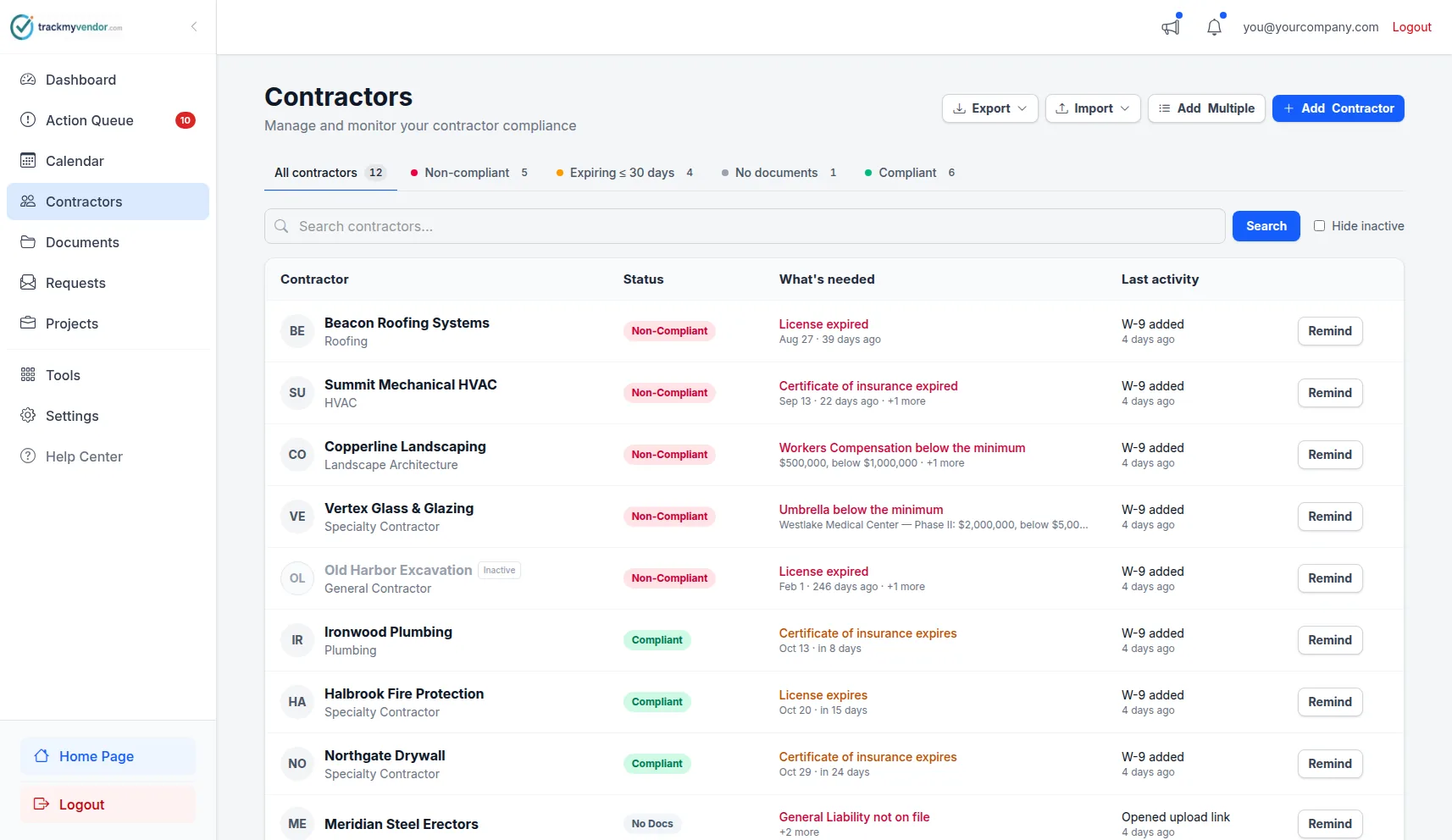
Your full sub roster with live license and COI status. See who's compliant before the job starts.
The construction COI tracking challenge — and what runs without you
General contractors juggle dozens of subs across trades and jobs. Here is where sub paperwork usually breaks, and what TrackMyVendor does about each one on its own:
A sub's GL renews in March and their workers' comp in June — and the one nobody notices is the one that lapses.
Handled automatically: Every coverage line's dates come off the ACORD 25 on their own. The sub gets an upload link at 90, 60, 30 and 7 days before each one, and your team gets a copy.
A license gets suspended mid-project, and the sub isn't going to tell you.
Handled automatically: Licenses are re-checked against the state board every day. A suspended or inactive license turns the sub Non-Compliant and puts them in your Action Queue.
The owner's contract asks for $2M GL on this job; the sub's certificate says $1M, and nobody reads that far.
Handled automatically: Set the job's minimums once. A short certificate is flagged the day it's uploaded, naming the line and the shortfall.
Your PM spends hours a week chasing PDFs by email and text.
Handled automatically: Subs upload from their phone through their own link — no login. If nothing comes back in three days, they get a reminder automatically; everyone else outstanding is one click.
An inspector or the owner's rep asks for proof on site, today.
Handled automatically: Every sub's status, per job, is on your phone, with each certificate one tap away.
The 90/60/30/7-day emails to subs and per-job minimums are on paid plans; reading certificates, the daily license check and the three-day follow-up are on every plan. Compare plans.
Not sure how exposed you are?
Take our free 5-minute compliance assessment and find out exactly where your process has gaps.
Common subcontractor trades to track
Track GL Limits and Coverage Requirements per Job Site
Most compliance tools are built for enterprise risk teams — expensive, complex, and overkill for a GC managing 10–50 active subs. TrackMyVendor is subcontractor compliance software built specifically for general contractors, and the job it does first is the one that eats the most time: COI tracking. Each sub's certificate of insurance arrives through a magic link — no account, no portal — is read by AI for coverage dates, limits and policy numbers, and then chases itself, with renewal notices going to the sub as well as to you. Behind that certificate, the sub's state license keeps being checked daily, which is the part COI-only tools leave to you. For the controls behind all of it — verify, transfer by contract, monitor, document — see the construction risk management guide.
- Subs upload their COI, W-9 and anything else you ask for in under 2 minutes — no login, no chasing
- AI extracts GL, auto, workers' comp and umbrella limits and expiration dates automatically, and reads the endorsement forms behind them
- Set coverage minimums per project and flag subs underinsured for a specific job
- License status re-checked against the state board daily — a suspended sub turns Non-Compliant the morning the board records it
Unlike enterprise alternatives that charge per document or require a minimum contract, TrackMyVendor is free for your first 25 subs, with no credit card — and unlimited subs cost less than finding one expired license on inspection day. See the plans. For the full feature treatment — AI parsing, the ACORD-form workflow, and expiration alerts in depth — see COI tracking software, or read the guide to how to track subcontractor insurance.
Try it free — first 25 subs at no costSimple, transparent pricing
Every plan verifies subcontractor licenses against the state databases. Start free with your first 25 subs.
Free
Organize your roster and run COI tracking at zero cost. Free forever, no credit card.
- ✓AI COI parsing & W-9 parsing — carriers, limits, dates and TINs read for you
- ✓50-state license tracking, plus automated license verification against state databases
- ✓Magic link onboarding — documents arrive through an upload link, no account needed
- ✓Document vault — contracts, licenses, W-9s and insurance, filed by category
- ✓Weekly compliance digest — a summary email of upcoming expirations
- ✓Timestamped audit trail — the full history of every certificate
- –Renewal reminders are sent by you — one click emails the upload link
Pay as you go
Hands-free automation for a small roster, without a flat monthly fee. 30-day free trial, no credit card.
- ✓Everything in Free
- ✓Automated renewal reminders — email alerts at 90/60/30/7 days to your team and the subcontractor
- ✓Projects & job sites — group subcontractors by job, with per-project coverage rules
- ✓Calendar feed — deadlines live in Google Calendar, Outlook or Apple Calendar
- ✓Bulk roster import — from a CSV or a certificate archive
- ✓Billed monthly for the most you tracked at once — only subcontractors with a document or license on file count, and inactive ones cost $0
Starter
Flat, predictable pricing for active general contractors and property managers.
- ✓Everything in Pay as you go
- ✓Unlimited subcontractors — no per-record fees and no 40-record ceiling
- ✓Predictable monthly bill — one fixed price as your roster grows
- ✓2 user seats — invite a second team member or coordinator
Pro
Full automation, endorsement checks and integrations for growing teams.
- ✓Everything in Starter
- ✓AI endorsement verification — reads the additional insured, waiver of subrogation and primary & non-contributory pages
- ✓Unlimited users & roles — access for foremen, office managers and admins
- ✓QuickBooks & integrations — QuickBooks Online, the API, Zapier, Make, Slack and Teams
- ✓Insurance audit report — every sub's coverage and gaps over your policy year, for the premium audit
- ✓Third-party categories — vendors, tenants, renters and franchisees on their own lists
No contracts. Cancel anytime. See the full plan comparison →
Frequently asked questions
Can I track subcontractors across multiple projects?
How do I get subcontractors to send me their documents?
Which states can I verify licenses for?
What happens if a subcontractor's license expires mid-project?
Do my subcontractors need to create an account to upload documents?
What is subcontractor compliance software for general contractors?
How much does subcontractor compliance software cost for a general contractor?
Subcontractor Compliance Checklist (PDF)
Pick the sections you need — Insurance, Licenses, Tax Documents, Safety Training, and more — and download a print-ready checklist. No sign-up required.
Stop chasing subs for paperwork
Set each job's minimums once. TrackMyVendor collects every COI and W-9, checks licenses daily, and asks subs for renewals before they lapse.
Start free — verify your first 25 subs in minutesNo credit card required
Explore More
Subcontractor Management Software
Every sub's license, COI and W-9 in one dashboard
License Verification
Search 1M+ licenses and monitor your sub roster daily
Contractor Compliance Software
Full compliance platform for GCs and property managers
COI Tracking Software
Collect, read and track every certificate of insurance
Compare COI Tracking Software
How TrackMyVendor compares to myCOI, Billy, TrustLayer and more
Track Subs by Job
Which subs are on which job, and who is cleared on each
Compliance Rules for General Contractors
Company floor for every sub, owner flow-downs on the job that demands them
Contractor Onboarding Software
Onboard subcontractors without the back-and-forth
Roofing Contractor Compliance
COI, endorsement, and license verification built for roofing risk
How to Verify a Contractor License
Step-by-step guide to license verification
Free Compliance Assessment
AI assessment of your subcontractor compliance process
Free Compliance Checklist
Download a free PDF compliance checklist
Plans & Pricing
View plans and start your free trial