
Automated W-9 Collection Software for Subcontractors
Send a magic link when you add a sub. They upload their W-9 from any phone — no account, no login. By the time 1099 season hits, every form is already on file.
No credit card required · Cancel any time
The W-9 problem that happens 52 weeks a year
You've got a new sub starting Monday. Before accounting sets them up for payment, they need a W-9 on file. You send an email. They're on a job site. A week goes by. Now you're paying them and the W-9 still isn't there. Your boss asks where it is. That's on you to explain — not accounting, not the sub.
Collect and Store W-9s Through the Same Link as the COI
Collect W-9s at onboarding — not at year-end.
Add the sub — send the W-9 request at the same time
One-time linkWhen you add a new sub, send them a secure magic link. The same link lets them upload their W-9, COI, and any other required documents — all in one request, no back-and-forth.
Sub uploads directly — no account required
From phone or desktopThe sub uploads their signed W-9 via the secure link — no login, no app, no portal. The document lands in your dashboard and their compliance status updates instantly.
Track who's submitted — follow up on who hasn't
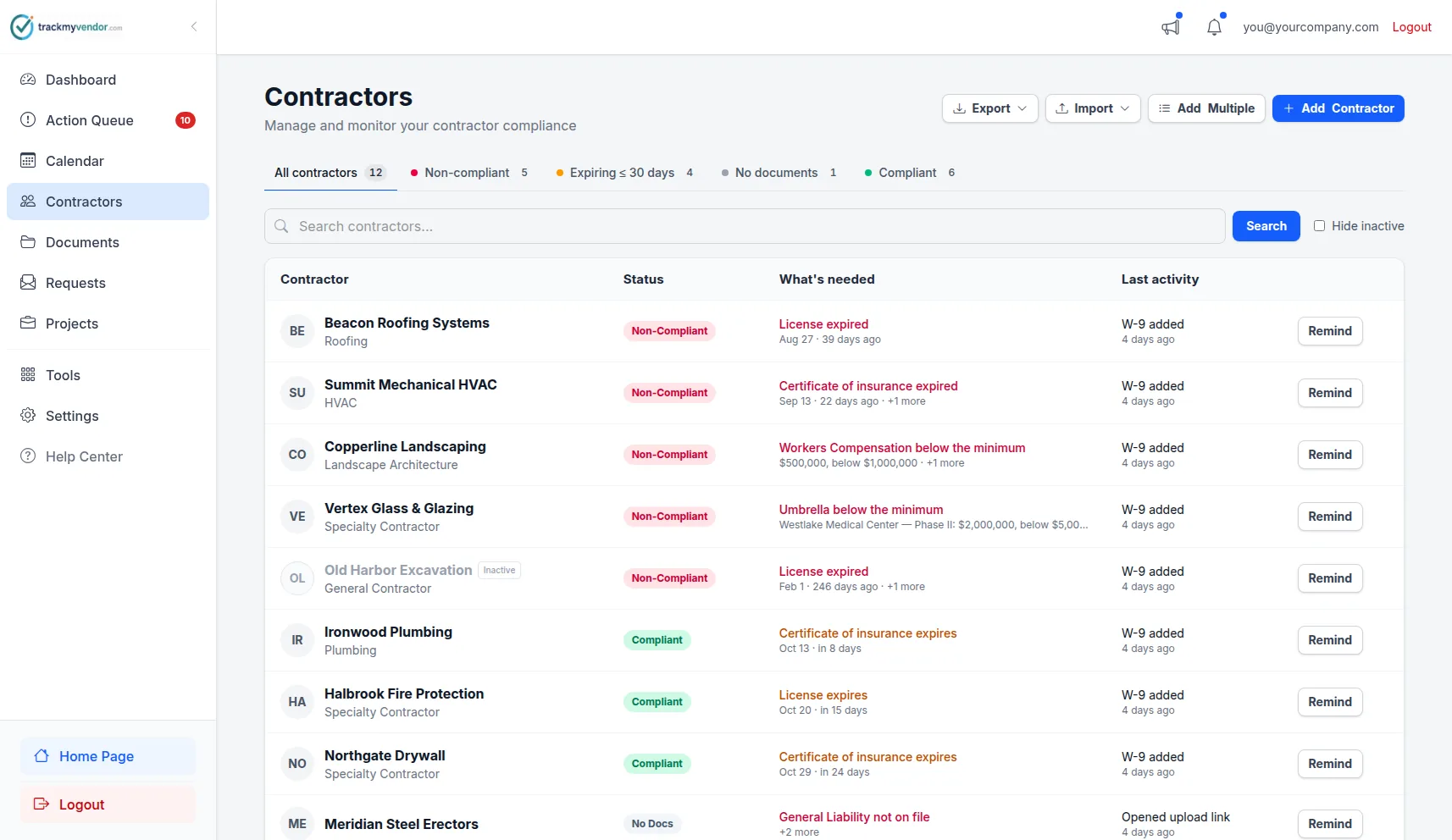
Real-time statusYour dashboard shows W-9 status for every sub — submitted, missing, or flagged. Filter for missing W-9s and send a reminder with one click. By the time 1099 season arrives, the work is already done.
The magic link handles the whole process — request, upload, dashboard update.
No PDF attachments over email. No saving to desktop and hoping you find it later.
W-9 Data Extraction: the Form Is Read for You
When a sub uploads a W-9 as a PDF, AI reads it and fills in the record — on every plan, Free included. Nobody retypes the form into your vendor list.
Who the sub is
Name as shown on the tax return, business or disregarded-entity name,, and the street address with city, state and ZIP.
How they file
Federal tax classification — individual or sole proprietor, C or S corporation, partnership, trust or estate, LLC — so you know at a glance who gets a 1099.
Which TIN, without storing it
Whether the sub gave an SSN or an EIN, and its last four digits only. The full number is never extracted into the record.
When it was signed
The signature date, so an unsigned or years-old form stands out before 1099 season rather than during it.
W-9 tracking plus every other compliance document
TrackMyVendor tracks W-9 alongside COIs and contractor licenses — one complete picture of each sub's status.
W-9 Forms
Collected at onboarding, stored securely, status visible at a glance
Certificates of Insurance
AI-parsed COIs with expiration tracking and automated renewal alerts
Contractor Licenses
Verified automatically against TX, FL, CA, WA, OR, IL, CO, AZ, CT, AR, VA, and OH state databases
Other Documents
Safety certs, OSHA cards, signed agreements, and more
Streamline 1099 Tax Prep for Construction and Property Management
W-9 collection shouldn't be a Q4 fire drill.
| Email chase | TrackMyVendor | |
|---|---|---|
| When W-9 is collected | At year-end (usually too late) | At onboarding, before first payment |
| What the sub has to do | Email attachment or scan | Upload via link — no login |
| Where the form is stored | Email inbox, maybe a folder | Secure dashboard, instantly findable |
| Who's still missing a W-9 | Unknown until someone asks | Visible in dashboard — one-click reminder |
| Same system as COI tracking | No — separate process | Yes — one request collects both |
"We used to send a W-9 request email and then forget about it for months. Now I add a sub and the link goes out automatically. I haven't manually chased a W-9 since we started using this."
Simple, transparent pricing
W-9 collection is included on every plan, including Free.
Free
Organize your roster and run COI tracking at zero cost. Free forever, no credit card.
- ✓AI COI parsing & W-9 parsing — carriers, limits, dates and TINs read for you
- ✓50-state license tracking, plus automated license verification against state databases
- ✓Magic link onboarding — documents arrive through an upload link, no account needed
- ✓Prospects — vet a sub before you hire: one link, then approve or decline
- ✓Document vault — contracts, licenses, W-9s and insurance, filed by category
- ✓Weekly compliance digest — a summary email of upcoming expirations
- ✓Timestamped audit trail — the full history of every certificate
- –Renewal reminders are sent by you — one click emails the upload link
Starter
Flat, predictable pricing for active general contractors and property managers.
- ✓Everything in Free
- ✓Unlimited subcontractors — no per-record fees and no 25-record ceiling
- ✓Automated renewal reminders — email alerts at 90/60/30/7 days to your team and the subcontractor
- ✓Safety documents read for you — EMR from the EMR letter, TRIR worked out from the OSHA 300A
- ✓Projects & job sites — group subcontractors by job, with per-project coverage rules
- ✓Calendar feed — deadlines live in Google Calendar, Outlook or Apple Calendar
- ✓Bulk roster import — from a CSV or a certificate archive
- ✓QuickBooks Online — compliance status on each matched vendor record, kept current automatically
- ✓2 user seats — invite a second team member or coordinator
Pro
Full automation, endorsement checks and integrations for growing teams.
- ✓Everything in Starter
- ✓AI endorsement verification — reads the additional insured, waiver of subrogation and primary & non-contributory pages
- ✓Unlimited users & roles — access for foremen, office managers and admins
- ✓API & integrations — the API, webhooks, Zapier, Make, Slack and Teams
- ✓Insurance audit report — every sub's coverage and gaps over your policy year, for the premium audit
- ✓Third-party categories — vendors, tenants, renters and franchisees on their own lists
- ✓QuickBooks auto-sync — new and changed QuickBooks vendors reach your roster within minutes
No contracts. Cancel anytime. See the full plan comparison →
What to look for in W-9 collection software
Should W-9 collection be part of your COI system?
What's the IRS risk of not having W-9s on file?
When is the right time to collect a W-9?
Frequently asked questions
How do I collect W-9 forms from subcontractors?
Can I automate W-9 collection?
What happens if a sub doesn't submit a W-9?
Can I track W-9 and COI in the same system?
How much does W-9 tracking cost?
Get W-9s at onboarding — not when accounting asks
Send a magic link when you add a sub. They upload from their phone. You move on. Every week, not just in Q4.
Start 30-day free trialNo credit card required
Explore More
COI Tracking Software
Collect, read and track every certificate of insurance
Subcontractor Credential Tracking
Platform that tracks licenses, COIs, and W-9s for every sub
Contractor Onboarding Software
Onboard subcontractors without the back-and-forth
Document Storage
Manage all compliance documents securely
Alerts and Reminders
Get notified before documents expire
General Contractor Compliance Software
Subcontractor compliance software for GCs — licenses, COIs & W-9s
Vendor Insurance Tracking for Property Managers
Track vendor COIs, licenses & W-9s across every property
Staffing Agency Compliance
COI & W-9 tracking for every placement across your 1099 workforce
Transportation & Logistics Compliance
Auto liability COIs, W-9s & authority docs for owner-operators
Plans & Pricing
View plans and start your free trial