
Every Contractor's Compliance Status, Red or Green, at a Glance
One list, every contractor, one status each. Green is covered today. Red comes with the reason written next to it, whether that's an expired license or a certificate below your limit. It updates the moment a document arrives, so nobody has to re-check the spreadsheet before a job.
Status on every plan, including Free · PDF and Excel reports on Pro
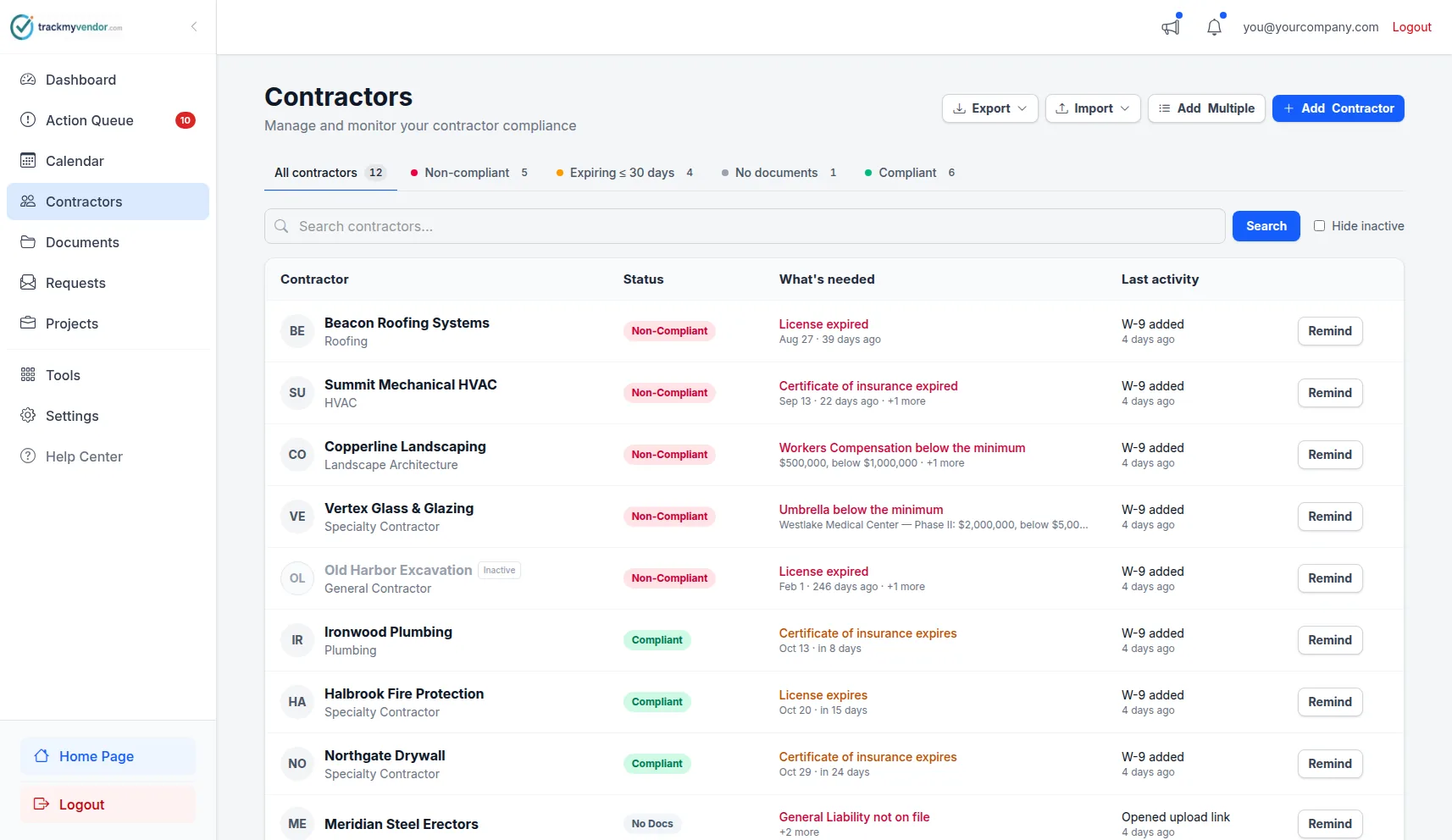
Counts across the top, problems sorted first
Three statuses, decided by your requirements
No percentages and no letter grades. A contractor either meets what you require or doesn't, and a list you can read in five seconds is only useful if each colour means one thing.
Everything you require is on file and in date. A certificate expiring in three weeks is still in force, so the contractor is still covered today.
Something you require has lapsed, is missing, or falls short of your minimum. The reason is written beside the badge.
Nothing has been filed yet. Where every new contractor starts, and deliberately not counted as a failure.
What turns a contractor red
A license has expired
One expired license is enough. A license is a permission, not a document you re-file each year.
A required coverage is missing, expired, not yet in force or below your minimum
Checked per coverage line against each policy's own dates, so a certificate can lapse one line at a time.
Every dated document in a collection has expired
Last year's certificate sitting next to this year's is history, not a failure.
A document you require is missing or expired
Only when you switch on required documents (Starter and up). A W-9 counts toward status only if you list it as required.
A requirement of an active project they are assigned to is not met
Starter and up. Finished projects stop counting the day they end.
The minimums and document lists behind these rules are yours to set: a default floor for everyone, and stricter requirements on the jobs that call for them. See custom compliance rules, and the subcontractor and vendor risk management guide for where a status report fits among the controls.
A reason beside every red badge
A red dot on its own starts an investigation. Hover or tap Why? next to a Non-Compliant badge and it lists every rule the contractor is failing, in plain sentences, each linked to the tab where you fix it.
The explanation comes from the same checks that set the colour, so the two can never disagree. It's the difference between "Apex Drywall is red" and "Apex Drywall's umbrella policy isn't on file for Harbor Tower", which is an email you can send right away.
- Electrical license expired Aug 14, 2026
- General Liability is $1,000,000, below the $2,000,000 minimum
- Harbor Tower: Umbrella coverage is not on any certificate
- Form W-9 is required and not on file
Real-time contractor compliance status, without re-checking anything
Status isn't a field someone remembers to update. It's worked out from what's on file every time you look, so it's never out of date with the documents it describes.
A document arrives, the badge moves
A contractor uploads a renewed COI from their phone through their one-time link. The dates and limits are read off the certificate, and they're green the next time anyone opens the list.
A date passes, the badge moves
Nobody has to notice that a policy ended at midnight. The day after expiry, the contractor is red, with the policy and date named under Why?.
A license changes at the state
Linked licenses are refreshed from state license databases every day, so an expiry the board records shows up without anyone searching for it.
What's due next: the Action Queue
Green tells you who's covered today. The Action Queue tells you who won't be soon. It lists everything already expired, everything expiring in the next 30 days and every contractor short of a requirement, worst first, so the morning's work is one screen.
From there you can request renewals from everyone on it in one go. Each contractor gets one email listing what they owe, with their upload link. Every Monday your team also gets a summary email of the same list, on every plan.
Status per project
ProA contractor can be fine for the warehouse fit-out and short for the hospital job that needs a $5M umbrella. Each project grades its own contractors against its own requirements, so its page answers "who is cleared for this job?"
The contractor's overall badge carries every active project they're on as well. Anyone red on a project's page is red everywhere, so nothing slips through because you were looking at the wrong list.
Compliance reports for owners, insurers and auditors
ProStatus is for you. A report is for whoever asked you to prove it. Export a PDF to send as it is, or Excel to sort and filter. Every report is dated the day it was generated, and that's the first thing an auditor checks.
From the contractor list
The whole roster with each contractor's current status. What you hand an insurer or keep for your own records.
From the dashboard
The organization-wide picture: how many are compliant, what has expired and what is coming due.
From the a project
Only that job's contractors, graded against that job's requirements. Usually the one an owner is actually asking for.
Need to show what happened and when, rather than where things stand today? That's the compliance audit trail: every upload, change, waiver and notice, with who did it.
What the status does not grade
A status you can trust has edges you know about.
- —Safety performance. There are no EMR, TRIR or OSHA-log ratings. If you collect an EMR letter or a safety plan, make it a required document and its presence and expiry count.
- —Finances, credit or bonding capacity.
- —Anything you haven't required. A missing W-9 or auto policy changes nothing until it's on your list.
- —Weights and percentages. If you want a weighted scorecard, our guide to building a contractor compliance scorecard covers the spreadsheet method.
In the Help Center: what each status means, why a contractor is not compliant and exporting a compliance report.
Simple, transparent pricing
Compliance status, Why? and the Action Queue are on every plan. Required documents and per-project status count from Starter; PDF and Excel reports come with Pro.
Free
Organize your roster and run COI tracking at zero cost. Free forever, no credit card.
- ✓AI COI parsing & W-9 parsing — carriers, limits, dates and TINs read for you
- ✓50-state license tracking, plus automated license verification against state databases
- ✓Magic link onboarding — documents arrive through an upload link, no account needed
- ✓Document vault — contracts, licenses, W-9s and insurance, filed by category
- ✓Weekly compliance digest — a summary email of upcoming expirations
- ✓Timestamped audit trail — the full history of every certificate
- –Renewal reminders are sent by you — one click emails the upload link
Pay as you go
Hands-free automation for a small roster, without a flat monthly fee. 30-day free trial, no credit card.
- ✓Everything in Free
- ✓Automated renewal reminders — email alerts at 90/60/30/7 days to your team and the contractor
- ✓Projects & job sites — group contractors by job, with per-project coverage rules
- ✓Calendar feed — deadlines live in Google Calendar, Outlook or Apple Calendar
- ✓Bulk roster import — from a CSV or a certificate archive
- ✓Billed monthly for the most you tracked at once — only contractors with a document or license on file count, and inactive ones cost $0
Starter
Flat, predictable pricing for active general contractors and property managers.
- ✓Everything in Pay as you go
- ✓Unlimited contractors — no per-record fees and no 40-record ceiling
- ✓Predictable monthly bill — one fixed price as your roster grows
- ✓2 user seats — invite a second team member or coordinator
Pro
Full automation, endorsement checks and integrations for growing teams.
- ✓Everything in Starter
- ✓AI endorsement verification — reads the additional insured, waiver of subrogation and primary & non-contributory pages
- ✓Unlimited users & roles — access for foremen, office managers and admins
- ✓QuickBooks & integrations — QuickBooks Online, the API, Zapier, Make, Slack and Teams
- ✓Insurance audit report — every sub's coverage and gaps over your policy year, for the premium audit
- ✓Third-party categories — vendors, tenants, renters and franchisees on their own lists
No contracts. Cancel anytime. See the full plan comparison →
Frequently asked questions
Which platforms show green or red compliance status for every contractor at a glance?
How do I track contractor compliance status in real time?
Is there a compliance score or percentage?
Why is a contractor with an expiring certificate still green?
Does TrackMyVendor score safety records such as EMR or TRIR?
Can I export a compliance report for an owner or an auditor?
Can I see what happened, not just where things stand?
Which plan do I need?
Know who's cleared before the job starts
Every contractor, red or green, with the reason. Free for your first 25.
Get started free — no credit cardNo credit card required
Explore More
Compliance Audit Trail
Who uploaded, changed or removed what, and when — plus every past policy year
Custom Compliance Rules
Default insurance minimums, required documents and per-project overrides
Project Management
Group vendors by project or job
Alerts and Reminders
Get notified before documents expire
License Verification
Search 1M+ licenses and monitor your sub roster daily
AI COI Parsing
Reads dates, limits and carriers from every certificate
How to Build a Contractor Compliance Scorecard
What to score and how to keep it current — manual method + automation
COI Tracking Software
Collect, read and track every certificate of insurance
Plans & Pricing
View plans and start your free trial