
COI Tracking Software: Automated ACORD 25 Verification
Verifies the contractor, not just the document.
TrackMyVendor is certificate of insurance software that collects COIs through a magic link, reads them with AI, and checks each contractor's license live against state databases — so a lapsed policy or a suspended license never slips past you. Set up in under 10 minutes; free for your first 25 contractors.
No credit card required
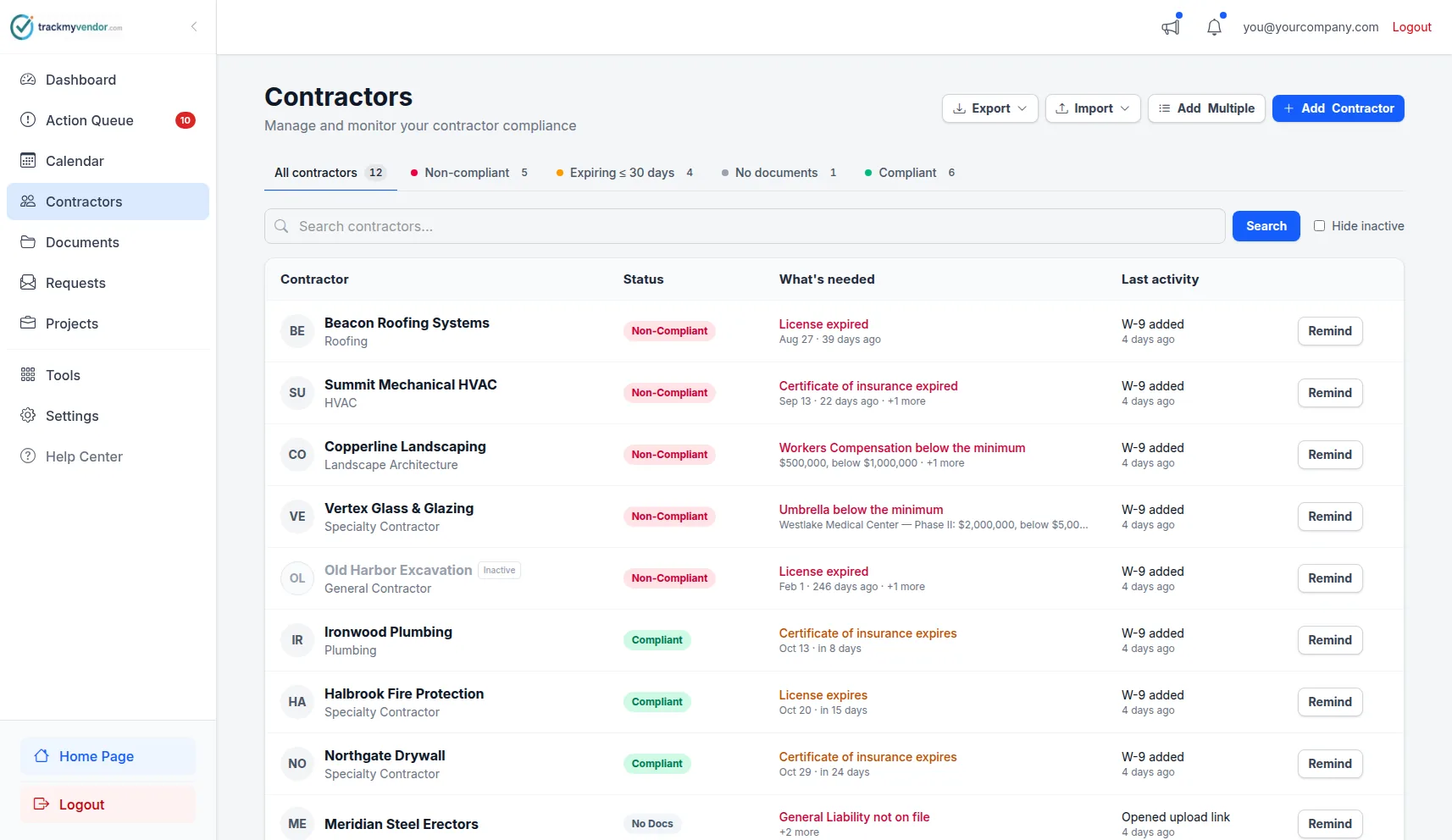
COI status, license verification & expiration alerts in one view
How certificate of insurance tracking software works
From first sub to first alert — set up in under 10 minutes.
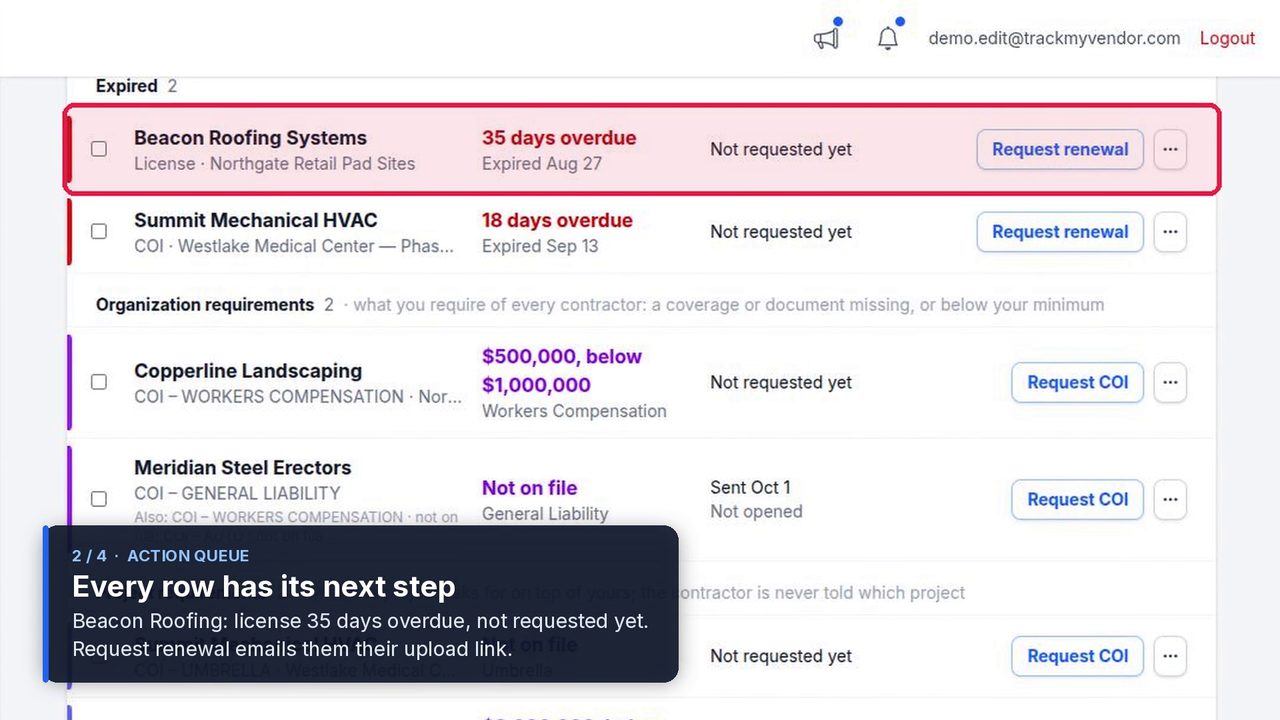
Import your sub roster
Bulk importUpload a CSV of your existing subs or add them one at a time. Name and email is all you need to get started.
Send a magic link
Magic linkTrackMyVendor emails the sub a one-time upload link. No account, no portal login required on their end. They upload COI and W-9 from their phone in under 2 minutes.
AI reads the COI
AI parsingOur AI extracts coverage limits, policy types, and expiration dates from the uploaded PDF automatically — each one landing on the compliance calendar. No manual data entry, no mistyped dates causing a false "compliant" status.
License verified in real time
Real-time checkWe query TX TDLR, FL DBPR, CA CSLB, WA L&I, OR BCD, IL IDFPR, or CO DORA directly to confirm the contractor's license is active — not just their insurance. A clean COI and a suspended license can coexist. We catch that.
Dashboard updates — alerts fire automatically
Green (compliant), yellow (expiring), red (non-compliant). At 90/60/30/7 days before any expiration, you and your sub both get an email — with a renewal upload link attached so you never have to follow up manually.
Automated COI Review: Expiration Dates and Policy Limits Read for You
Six things a spreadsheet can't do. TrackMyVendor is COI management software built for contractors: it goes beyond tracking to automate collection, compliance checks, and reporting.
AI COI Parsing
Reads uploaded PDFs and extracts dates, limits, and policy types automatically. No manual data entry.
Magic Link Uploads
Subs submit COI and W-9 via secure link — no account, no portal login, no chasing email threads.
Live License Verification TX · FL · CA · WA · OR · IL · CO · AZ · CT · AR · VA · OH
State databases checked in real time. Active, expired, or suspended — no other COI tool does this.
Expiration Alerts
90/60/30/7-day alerts to you and your sub, with renewal upload link attached. No manual follow-up.
Per-Project Requirements
Set coverage minimums per project. Flags subs underinsured for a specific job, not just your defaults.
QuickBooks Online, Zapier & Make Integrations
Each sub's compliance status on their QuickBooks vendor record, where bills get approved. Route alerts to Slack, Google Sheets, or 6,000+ apps. No code.
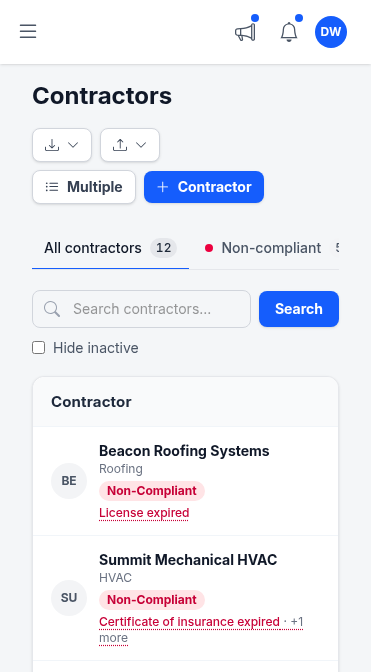
Every sub's status. From your phone.
Green means fully covered and licensed. Amber means something expires soon. Red means they should not be on site. No hunting through folders — the answer is one tap away.
- Mobile-optimized dashboard — no squinting at spreadsheet columns on a job site
- Filter by project — see only the subs working this week
- Export compliance report as PDF or CSV for your owner or insurance broker
We verify the contractor, not just the document
Most COI platforms stop at the PDF. We go to the source.
| What you need to know | Other COI tools | TrackMyVendor |
|---|---|---|
| Is this contractor's insurance current? | Yes — tracks expiration dates | Yes — tracks expiration dates |
| Is this contractor's state license active? | No — licensing databases not checked | Yes — TX, FL, CA, WA, OR, IL, CO, AZ, CT, AR, VA & OH databases, re-checked automatically |
| Can subs upload documents without an account? | Usually no — vendor portal login required | Yes — one magic link, no account needed |
Weighing named platforms against each other? That is a different question, and it has its own page: compare TrackMyVendor, myCOI, Billy, TrustLayer and Jones side by side →
Competitor capabilities based on publicly documented features as of April 2026.
COI Tracking Software vs. Manual Spreadsheets
Whether you shop for it as COI tracking software, COI management software, or COI solutions outright, the job is the same — and most tools stop at the document. Most GCs managing 10–150 subcontractors spend 3–5 hours a week chasing insurance certificates — that's before accounting for the real exposure. TrackMyVendor is an insurance tracking system built specifically for contractors and property managers who can't afford to let a lapsed policy slip through. Still weighing the two? Read COI tracking software vs. a spreadsheet for where the tipping point actually falls.
Lost per week
Emailing subs, updating spreadsheets, hunting for the latest PDF before an inspection.
COIs expire unnoticed
Without automated alerts, policies lapse silently — often discovered only after an incident.
Coverage on a lapsed policy
A COI proves coverage existed at issue — not that it's still active today.
The gap every other platform ignores
A COI tells you the contractor had insurance when the policy was issued. It says nothing about whether their license is active, suspended, or has open complaints. TrackMyVendor verifies both — every time.
Who this is for: general contractors managing 5–150 subcontractors who are tired of compliance being a full-time job. Property managers and GCs use TrackMyVendor as their vendor insurance tracking software to collect, verify, and monitor every certificate from one dashboard.
Certificate tracking beyond the COI: every document your subs and vendors owe you
TrackMyVendor is one of many COI management solutions on the market — and the only one that checks the license behind the certificate. It works as insurance certificate tracking software, and as the single place for every other document a sub owes you. COI tracking is where compliance starts, but it is not where it ends. A compliant sub has an active license, a current COI that meets your project's coverage minimums, a W-9 on file for 1099 season, and no open disciplinary actions with their licensing board. TrackMyVendor tracks all of it in a single dashboard — so when your owner asks for a compliance report or your insurance broker calls during an audit, you can pull the answer in under a minute, not over an afternoon.
Certificates of Insurance
Collected via magic link. AI-parsed on arrival. Expiration alerts at 90/60/30/7 days. Coverage limits checked against your project minimums.
Contractor License Status
Verified directly against TX TDLR, FL DBPR, CA CSLB, WA L&I, OR BCD, IL IDFPR, and CO DORA. Active, expired, or suspended — updated automatically. The check a COI can never replace.
W-9 Collection
Requested in the same magic link as the COI. Stored per subcontractor. Retrievable at year-end. Never chase a W-9 before January again.
Track COI, license status, and W-9 from one dashboard
First 25 subs free. No credit card. Setup takes under 10 minutes.
Per-project COI compliance — because a sub compliant for one job may not be for another
A subcontractor's annual COI is a snapshot of their coverage at issue date — not a guarantee they're covered for every job you assign them to. The owner, the contract value, and the work type all affect what "compliant" actually means on a given project.
Different owners require different additional insureds
Each owner typically requires their name — and sometimes their lender's — listed as an additional insured on your subs' COIs. A COI that satisfies one owner doesn't automatically satisfy another. TrackMyVendor tracks the required additional insured per project so you know exactly which subs need to update their certificate before a job starts.
Different project values require different GL minimums
A $1M GL limit is standard on small tenant improvements. A ground-up build or public project commonly requires $2M or more. A sub carrying $1M GL passes your organization defaults — but is underinsured for your larger jobs. TrackMyVendor flags that gap per project, not just against your blanket minimum.
A sub's single annual COI may cover some jobs but not others
Annual policies have blanket terms — certain locations, work types, or client categories may be excluded depending on how the policy is written. The COI existing is not the same as confirming it applies to a specific job. Per-project compliance templates make that check automatic so you're not relying on reading the policy fine print yourself before every job starts.
Per-project COI compliance starts on Starter
Set coverage minimums and required additional insureds per project. Subs who pass your defaults are re-evaluated per job automatically.
What GCs are saying
"We used to find out a sub's insurance lapsed when our insurance broker asked during a renewal audit. Now I get a 30-day warning and my sub gets the same email automatically. We've got 6 active projects running right now — I'm not chasing anybody for paperwork."
Mike R. — General Contractor, Dallas TX
Managing 40 subs across 6 active job sites
Simple, transparent pricing
AI COI parsing, magic link collection and license verification start free. Per-deadline expiration alerts and per-project coverage requirements unlock on Starter; endorsements and reports are Pro.
Free
Organize your roster and run COI tracking at zero cost. Free forever, no credit card.
- ✓AI COI parsing & W-9 parsing — carriers, limits, dates and TINs read for you
- ✓50-state license tracking, plus automated license verification against state databases
- ✓Magic link onboarding — documents arrive through an upload link, no account needed
- ✓Prospects — vet a sub before you hire: one link, then approve or decline
- ✓Document vault — contracts, licenses, W-9s and insurance, filed by category
- ✓Weekly compliance digest — a summary email of upcoming expirations
- ✓Timestamped audit trail — the full history of every certificate
- –Renewal reminders are sent by you — one click emails the upload link
Starter
Flat, predictable pricing for active general contractors and property managers.
- ✓Everything in Free
- ✓Unlimited subcontractors — no per-record fees and no 25-record ceiling
- ✓Automated renewal reminders — email alerts at 90/60/30/7 days to your team and the subcontractor
- ✓Safety documents read for you — EMR from the EMR letter, TRIR worked out from the OSHA 300A
- ✓Projects & job sites — group subcontractors by job, with per-project coverage rules
- ✓Calendar feed — deadlines live in Google Calendar, Outlook or Apple Calendar
- ✓Bulk roster import — from a CSV or a certificate archive
- ✓2 user seats — invite a second team member or coordinator
Pro
Full automation, endorsement checks and integrations for growing teams.
- ✓Everything in Starter
- ✓AI endorsement verification — reads the additional insured, waiver of subrogation and primary & non-contributory pages
- ✓Unlimited users & roles — access for foremen, office managers and admins
- ✓QuickBooks & integrations — QuickBooks Online, the API, Zapier, Make, Slack and Teams
- ✓Insurance audit report — every sub's coverage and gaps over your policy year, for the premium audit
- ✓Third-party categories — vendors, tenants, renters and franchisees on their own lists
No contracts. Cancel anytime. See the full plan comparison →
Frequently asked questions
How is this different from just collecting COIs in a spreadsheet?
Does it work with Procore?
Not yet. Procore integration is on the roadmap, and we'll announce it when it ships.
Here is what the workflow looks like in the meantime: your subs receive a magic link by email — no Procore login, no new account on their end. They upload their COI, W-9, and any other required documents in one step. Each submission is logged on the sub's timeline and counted on your dashboard. On Pro you can export a compliance report as Excel or PDF at any time and attach it to a Procore project or send it to your owner.
Most GCs find the magic link workflow is actually faster than managing document requests inside Procore, because subs don't need to be added to a project or given system access first. See how TrackMyVendor compares to other platforms →
Which states do you cover for license verification?
How do subcontractors submit documents?
How much does it cost?
Can I set different COI requirements for different projects?
How can I get alerted before a vendor's insurance certificate expires?
How much does manual COI tracking actually cost?
Do I need a COI from a contractor before they start work?
What happens if a subcontractor's insurance lapses mid-project?
Stop managing COIs in a spreadsheet. Start knowing your subs are actually licensed.
First 25 contractors free. No credit card. Set up in under 10 minutes.
Get started freeLearn more about COIs
New to certificates of insurance? These guides walk through everything from what a COI is to how to read, verify, and track one — in reading order.
Related guides and tools