AI COI Parsing
Upload a certificate of insurance PDF and AI instantly extracts carrier, policy, coverage types, limits, and expiration dates. No manual data entry.
Stop chasing contractors for COIs, W-9s, and license renewals. Start with the certificates and W-9s already in your inbox: drop them in and each one is read for you, checked against your coverage requirements and the state license board. You see who is short, send them one secure link they can answer from a phone, and get flagged the moment anyone falls out of compliance, in all 50 states.
No credit card required. Want a free audit? Take our 10-minute compliance assessment.
For General Contractors, Homebuilders, Specialty Contractors, Property Managers, HOAs, Commercial Cleaning, Security Guard Companies, Staffing Agencies & Transportation

A roster-wide score is not the same as knowing a contractor is covered for this job. Both are answered here.
Chasing subs for updated COI certificates that expired without warning
Following up on missing W-9s every time 1099 season hits
Paying a sub before anyone has checked their certificate
Manually tracking license expirations in a spreadsheet that's always one step behind
A folder of certificates in someone's inbox that nobody has actually read
W-9 tracking — send a secure request, see who's submitted, stay 1099-ready year-round
License monitoring for every sub, with alerts before anything lapses
A compliance score for every sub — know who's covered before the job starts
“All of the vendors live in one place and we can see their status.”
“Before TrackMyVendor, we just had a Google sheet to track our vendors. … It’s easier now because all of the vendors live in one place and we can see their status.”
Same documents, different vocabulary and different renewal cycles. Pick your industry to see what TrackMyVendor tracks for you.
For General Contractors
Set coverage requirements per job, collect COIs and W-9s through one link, and get flagged when a sub's license goes suspended mid-project. Different owners, different GL minimums, different subs — tracked per project instead of in one flat list. Vetting a new sub first? With the PreQual add-on, their EMR letter and OSHA 300A are read for you before you approve them.
What you'll track
For Property Managers
Fifty to two hundred vendors across a portfolio, each renewing on a different date. Vet a new vendor before the contract is signed, track certificates, licenses, and W-9s per property, and get alerts at 90/60/30/7 days — so an expired COI never turns into a denied claim on an owner's policy.
What you'll track
For Commercial Real Estate
A commercial property collects certificates from two directions: the tenants who occupy it and the vendors who maintain it. Collect both through one link that needs no account, have each certificate read for you, and see the tenant whose policy renewed at lower limits on the dashboard instead of in a claim.
What you'll track
For HOA Management
Boards expect proof, not assurances. Track every vendor's license with alerts before it lapses, keep current certificates on file for every vendor working the community, and produce the documentation trail when an owner or the board asks for it.
What you'll track
For Homebuilders
Framers, electricians, plumbers, HVAC — every trade on every lot, with its own license class and its own renewal cycle. Track every trade license against its own renewal date and catch the lapse before it becomes a warranty problem.
What you'll track
For Specialty Contractors
Flooring, painting, site work, landscaping and snow: you're the sub to the GC and the GC to your crews. Drop in the certificates you have, see which crew is short against your GC's minimums, and send one link for the rest — before the premium auditor asks.
What you'll track
For Commercial Cleaning
Group crews and subcontractors by client, building, or account, and see compliance status across every location under one relationship. Janitorial bonding and GL limits tracked alongside the certificates that prove them.
What you'll track
For Security Guard
High turnover means constant onboarding and reverification. Track every officer's state license, firearms permit, and training certificates from the credential they upload — in every state you operate in — with alerts before any of them lapse. Guard boards are not the contractor boards we sync with nightly, so officer credentials are tracked by document and expiry date.
What you'll track
For Staffing Agencies
A signed offer letter isn't a W-9, and a certificate isn't proof of eligibility. Collect both at placement through a secure link, track expirations through constant turnover, and answer a client audit filtered to one account in seconds.
What you'll track
For Transportation
Owner-operators are 1099 vendors, not employees — same COI and W-9 burden, just on wheels. Track auto liability, cargo coverage, and authority documents across a rotating pool, so dispatch has a live answer instead of an assumption.
What you'll track
For Private Schools
Paperwork comes from two directions: the vendors who work on campus and the outside groups who rent the gym, field or chapel. Collect both through one link that needs no account, let the certificate be read for you, and see what each one still owes instead of rebuilding the checklist in email every term.
What you'll track
For Municipalities
Contractors, special-event permit holders, concessionaires and facility renters all owe you a certificate of insurance, and each one lapses on its own schedule. Collect them through a link that needs no login, have every certificate read for you, and see who is short before the gates open.
What you'll track
For Franchises & Co-ops
Every franchisee is supposed to carry the insurance your agreement requires, with you named as additional insured. Collect each certificate through a link that needs no login, have it read and checked against your minimums, and get the renewal before a policy lapses, not after a claim.
What you'll track
Automated COI tracking, W-9 collection, and license monitoring for contractors anywhere in the country — so you know the status of everyone on your roster without checking anything manually.
Upload a certificate of insurance PDF and AI instantly extracts carrier, policy, coverage types, limits, and expiration dates. No manual data entry.
On a paid plan, each matched sub's QuickBooks Online vendor record carries a PDF of their compliance status, so it's in front of whoever approves the bill. The top plan adds QuickBooks auto-sync and connects Zapier, Make, Slack, Teams and the API.
Add a license from any state, for any trade, and get alerts before it expires. Where we sync with the official state database, 1 million+ licenses are re-checked every day — so a suspension reaches you with no upload, no renewal notice and no one telling you.
Send subs a secure link to submit their W-9 directly. See who's submitted and who hasn't, get reminders on missing forms, and stay 1099-ready year-round — without chasing anyone.
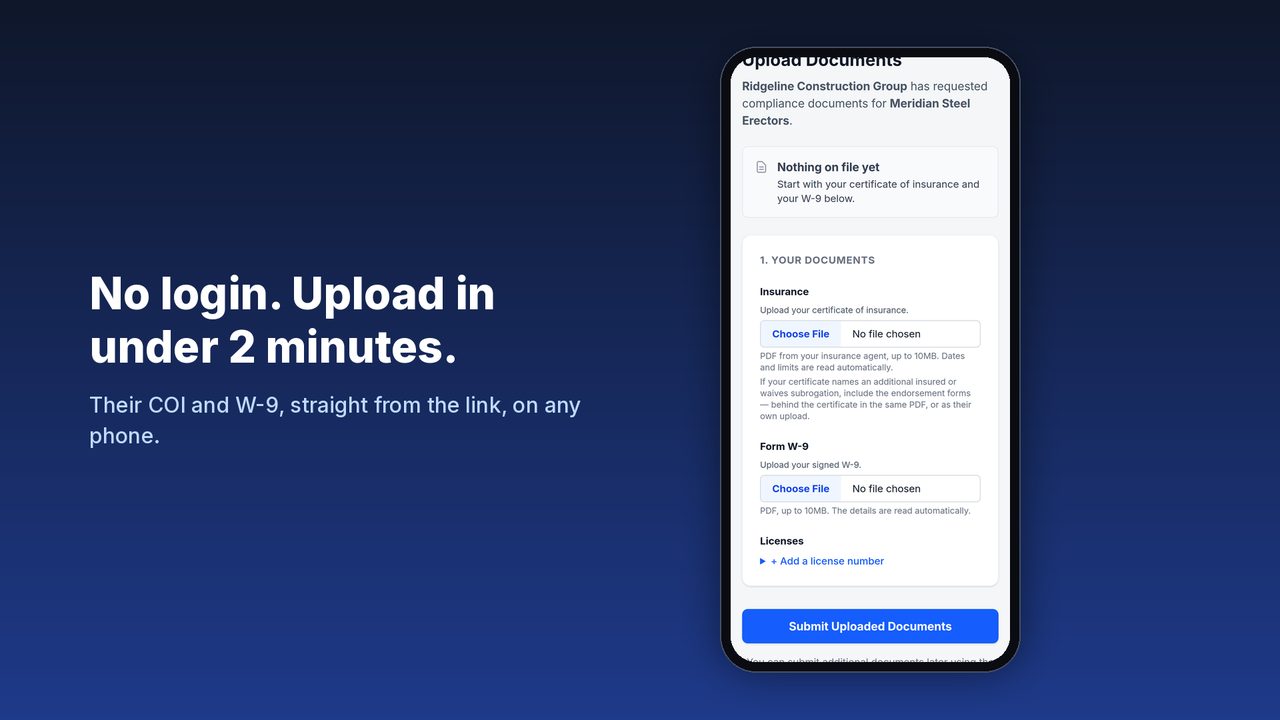
Send each sub one secure link — no login, from a phone — for their certificate of insurance, license, W-9 and your own forms. Each document is checked as it arrives, and reminders list exactly what's still missing. Vetting a sub first? The PreQual add-on handles prospects and approvals.
A Monday summary of everything expiring, and on a paid plan an email 90, 60, 30, and 7 days before each license or certificate expires, to your team and the sub, with the upload link in their copy.
Evaluating alternatives? See how TrackMyVendor compares to myCOI, Billy, and TrustLayer →
COI collected. W-9 tracked. License monitored. All automatic.
Add your subs by name or from a spreadsheet, then drop in the certificates and W-9s already sitting in your inbox. AI reads each COI (carrier, limits and every coverage line's dates) and files it on the sub's record. One at a time on the free plan; a whole folder at once on paid plans. Vetting a sub you haven't worked with yet? The PreQual add-on adds them as a prospect first. How vetting works.
Your list shows who is short: no certificate, a coverage line below your minimum, no W-9. Send those subs a secure link; they upload from a phone with no login, and what they send is read and checked the same way. Licenses are tracked alongside them, with the same alerts on every renewal date — so you're covered on all three fronts without chasing anyone or clicking through government sites.
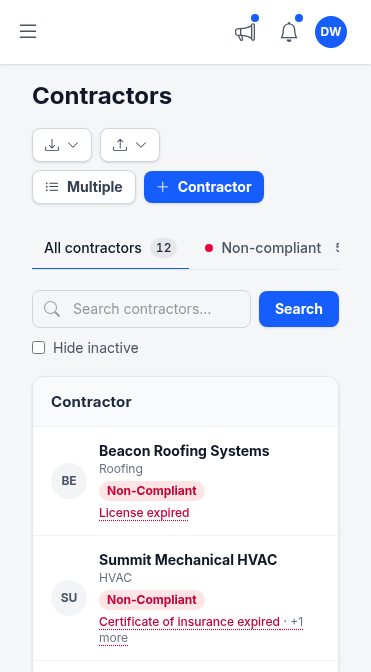
Your compliance dashboard shows COI status, W-9 submission, and license standing for every sub — all in one place. You get a Monday summary of everything expiring, and on a paid plan you and the sub get email alerts at 90, 60, 30, and 7 days before a COI or license expires. No calendar entries to maintain. No surprises when a job starts.
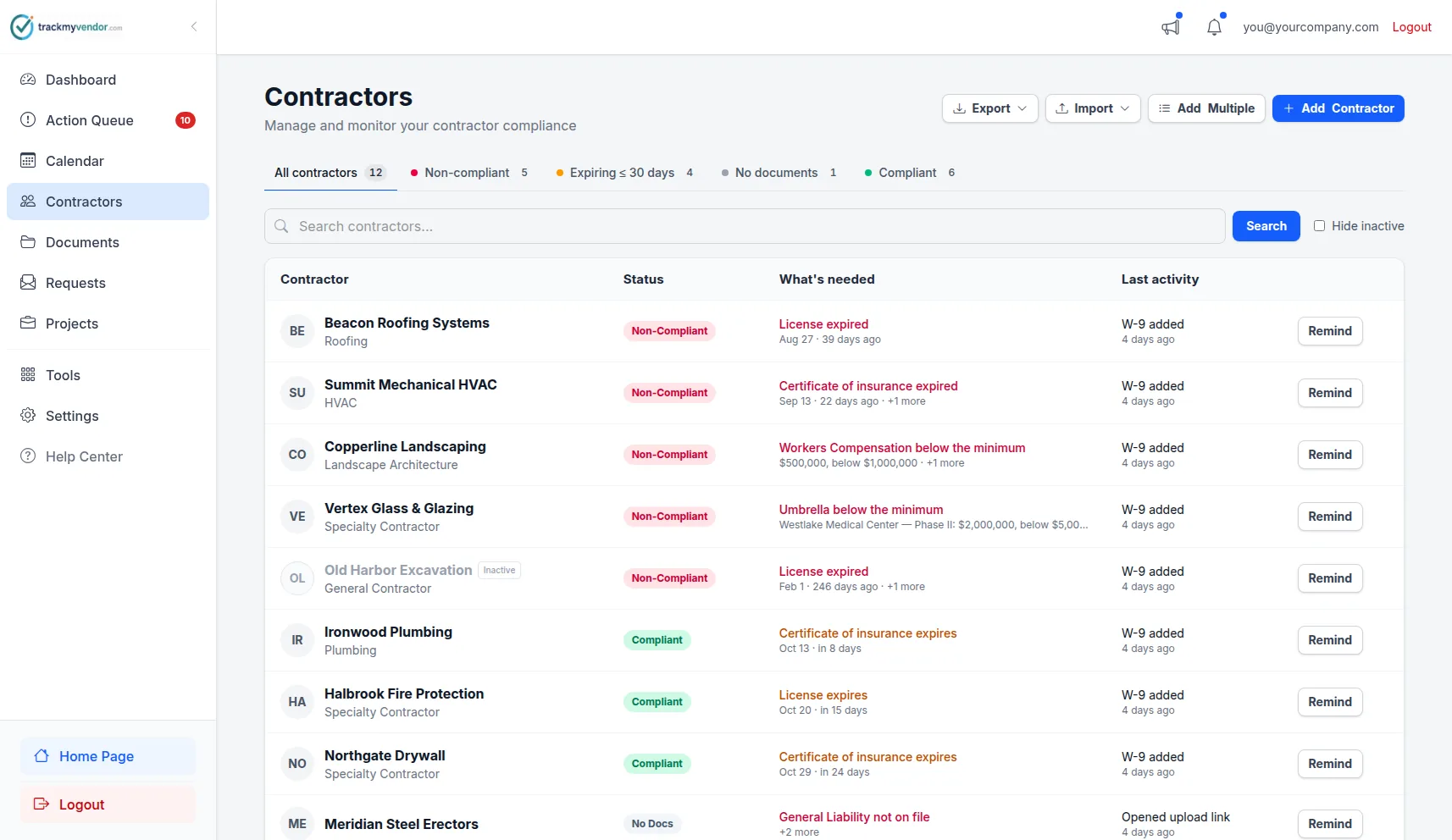
Every sub's compliance status at a glance. Red means stop. Green means go.
Add a license from any state, for any trade, and TrackMyVendor tracks its expiration and alerts you before it lapses. COIs and W-9s have no state boundary at all.
In Texas, Florida, California, Washington, Oregon, Illinois, Colorado, Arizona, Connecticut, Arkansas, Virginia and Ohio we go one step further: we sync with each official state database every time it publishes — daily in most of them. A license suspended overnight is flagged before the sub shows up on site — no upload, no renewal notice, no one telling you.
The automated state-database check is the one thing with a geographic scope. Everything else covers the whole country.
| What you track | All 50 states | Automated state-database check |
|---|---|---|
| Certificates of insurance (COI) | ✓ Yes — collected by secure link, parsed by AI, tracked to expiration | Not applicable — certificates come from the carrier, not a state database |
| W-9s | ✓ Yes — collected by secure link, name, TIN and tax classification read automatically | Not applicable — a W-9 is an IRS form, not a state record |
| Contractor licenses | ✓ Yes — add a license from any state with its expiration date and get the same alerts | ✓ TX, FL, CA, WA, OR, IL, CO, AZ, CT, AR, VA & OH — status re-checked every time the state publishes, more states added regularly |
| Any other document | ✓ Yes — bonds, safety records, contracts and certifications, filed by category | Not applicable |
Working in another state? Everything on this page still works — you enter the license once and we watch the date. See how license verification works →
Whether you're tracking subs on job sites, vendors across properties, placements, or owner-operators — pricing is based on the size of your roster, not your industry.
No contracts, no sales call. Start free — paid plans include a 30-day free trial.
Organize your roster and run COI tracking at zero cost. Free forever, no credit card.
Flat, predictable pricing for active general contractors and property managers.
Full automation, endorsement checks and integrations for growing teams.
Add to Starter or Pro. Not available on Free.
Vet subs from their documents, not a questionnaire.
Figures are read from the documents, not verified with the carrier, rating bureau, surety or OSHA.
For each job site switched on, on Starter or Pro. Not available on Free.
Know who is on site, and that their company is covered.
Ending a site stops its charge, prorated. Workers pay nothing and are never texted or emailed.
No contracts. Cancel anytime. See the full plan comparison →
Get started instantly with no signup required. Use our free tools to verify licenses, check compliance, and assess your risk.
Check a contractor's license against the official state database. Search by business name or license number — no account needed.
Look Up a LicenseDownload a ready-to-use contractor compliance checklist covering licenses, insurance, and documentation requirements.
Get the ChecklistAnswer a few questions and get an AI-powered report on your contractor compliance gaps and what to fix first.
Find Your Compliance GapsCommon questions from general contractors and property managers.
Stop finding out about lapsed COIs and suspended licenses after the fact. Get covered before the next job starts.
Get compliant in 10 minutes — freeNo credit card required · 30-day free trial · Cancel anytime
A question, a problem, an idea — whatever it is, it comes straight to us.