
Group Subs and Vendors by the Work They Do — and See Who Is Cleared on Each Job
A roster tells you who you work with. A project tells you who is on this job, when it runs, and whether every one of them is covered for it. Put your contractors on the jobs, properties or events they work, and the answer to "are we good to start?" is one screen.
30-day free trial · No credit card required

Every project with its dates, its contractors and its status.
A project is whatever your contractors show up for
A general contractor thinks in jobs, a property manager in properties, a school in rentals. The grouping is the same — a named piece of work, the people doing it, and the dates it runs — so the word is yours to choose.
A job
The hospital wing, the tenant fit-out, job #2417. Every sub mobilizing on it, and nobody who is not.
A property
The Linden, 240 units. The HVAC contractor, the pool service and the make-ready crew who work there.
A community
Willow Creek HOA, or its roof replacement. The vendors the board is paying for.
A rental or event
The league renting the gym this winter. The summer camp in the natatorium.
Call them Jobs, Projects, Sites, Locations, Properties — or your own word — on the Appearance tab in Settings, and the sidebar, the screens and the reports all say it.
How project-based contractor tracking works
Three steps, and the first two take a couple of minutes per job.
Create the project
A name you would recognize on a report — the address or the job number — a description, a start date and an end date.
Assign the contractors doing the work
Pick them from your roster. A sub can be on three jobs at once; their own page lists every project they are on, with its dates.
Read the project's status
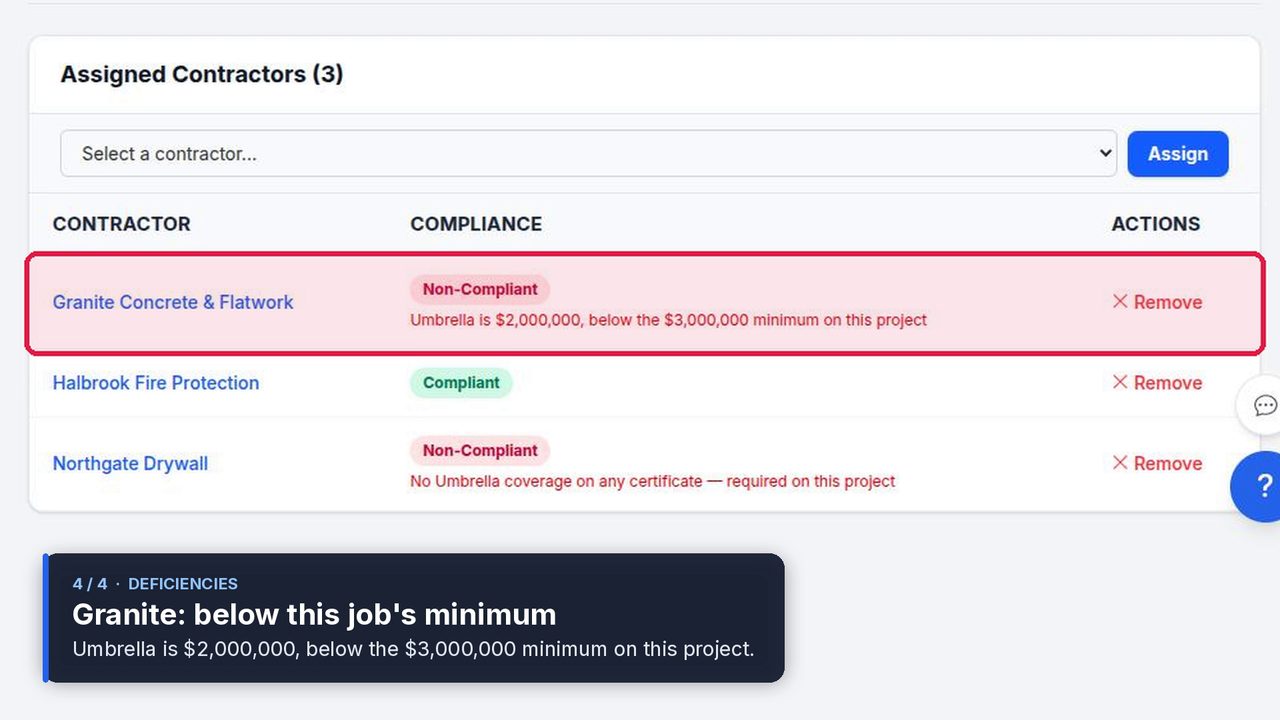
Each project is Compliant, Non-Compliant, or has nobody on it yet — filter the list by any of the three, and the dashboard counts them. Open one to see each contractor's status for that job, with Why? beside anyone short.
Every project has a start and an end
A certificate collected at mobilization is the one that lapses halfway through the job. The project's dates are what tell you which renewals matter now.
Dates wherever the project appears
On the project list, on the project's page, on each contractor's page beside the projects they are on, and on the exported report.
Renewals that fall inside the job
The compliance calendar lays every certificate and license renewal out by month. Read it against a project's dates and you know whose COI lapses before closeout — and on Starter and up, subscribe it into Google Calendar or Outlook next to the schedule.
A finished project stops counting
Once the end date passes, the project's requirements drop off every contractor's badge and out of the Action Queue. A sub who finished the hospital wing last spring is not red today for a limit your current work does not need.
Compliance per project, not just per roster
A sub can meet your standard $1M general liability and still fall short of an owner's $2M on one job. Give the project its own coverage minimums and required documents, and the shortfall shows up in three places at once.
On the project
The contractor is Non-Compliant for this job, graded against the project's own requirements, with the gap spelled out — "General Liability is $1,000,000, below the $2,000,000 minimum on this job."
On their badge
Their overall status carries every active project they are on, so red on any project page means red on the roster — with the project's name under Why?.
In the Action Queue
Project shortfalls get their own group, one section per project, separate from what is expired or expiring across the roster — so the job with a problem is the job you open.
The contractor is asked for what they owe through their upload link, which never names the project. How default and project requirements fit together.
A report about the one job somebody asked about
When an owner, a lender or a board asks "are your contractors on our project covered?", send the project's report — a dated PDF, or an Excel file to work with — listing the project's dates and every contractor assigned to it with their status for it. It answers their question without handing them your whole roster.
The projects list exports too, every project with its dates and status in one file. About compliance reports.
Projects, in your industry's words
The same grouping in four vocabularies — each with the dates, statuses and reports that industry actually works to.
General contractors
Subs by job
Which subs are on which job, from mobilization to closeout, and who is cleared on each.
Property managers
Vendors by property
The vendors servicing each property in the portfolio, and a report for each owner.
HOA & community associations
Vendor oversight
Every vendor contract with its term, each association's vendors, and proof they stay covered.
Private schools
Renters by rental
Each facility rental and summer campus project, with its own dates and its own renters.
Simple, transparent pricing
Projects are on Starter and up, and project reports on Pro, with a 30-day free trial. Every plan includes the roster, the compliance calendar and AI COI parsing.
Free
Organize your roster and run COI tracking at zero cost. Free forever, no credit card.
- ✓AI COI parsing & W-9 parsing — carriers, limits, dates and TINs read for you
- ✓50-state license tracking, plus automated license verification against state databases
- ✓Magic link onboarding — documents arrive through an upload link, no account needed
- ✓Document vault — contracts, licenses, W-9s and insurance, filed by category
- ✓Weekly compliance digest — a summary email of upcoming expirations
- ✓Timestamped audit trail — the full history of every certificate
- –Renewal reminders are sent by you — one click emails the upload link
Pay as you go
Hands-free automation for a small roster, without a flat monthly fee. 30-day free trial, no credit card.
- ✓Everything in Free
- ✓Automated renewal reminders — email alerts at 90/60/30/7 days to your team and the contractor
- ✓Projects & job sites — group contractors by job, with per-project coverage rules
- ✓Calendar feed — deadlines live in Google Calendar, Outlook or Apple Calendar
- ✓Bulk roster import — from a CSV or a certificate archive
- ✓Billed monthly for the most you tracked at once — only contractors with a document or license on file count, and inactive ones cost $0
Starter
Flat, predictable pricing for active general contractors and property managers.
- ✓Everything in Pay as you go
- ✓Unlimited contractors — no per-record fees and no 40-record ceiling
- ✓Predictable monthly bill — one fixed price as your roster grows
- ✓2 user seats — invite a second team member or coordinator
Pro
Full automation, endorsement checks and integrations for growing teams.
- ✓Everything in Starter
- ✓AI endorsement verification — reads the additional insured, waiver of subrogation and primary & non-contributory pages
- ✓Unlimited users & roles — access for foremen, office managers and admins
- ✓QuickBooks & integrations — QuickBooks Online, the API, Zapier, Make, Slack and Teams
- ✓Insurance audit report — every sub's coverage and gaps over your policy year, for the premium audit
- ✓Third-party categories — vendors, tenants, renters and franchisees on their own lists
No contracts. Cancel anytime. See the full plan comparison →
Frequently asked questions
What is a project in TrackMyVendor?
Can a contractor be on more than one project?
What happens when a project ends?
Do project dates appear on the compliance calendar?
Can a project have stricter insurance requirements than the rest of the roster?
Which plan includes projects?
Know who is on every job — and whether they are covered for it
Group contractors by the work they do, with the dates it runs and a status for each project.
Start free trial — Pro planNo credit card required
Explore More
Custom Compliance Rules
Default insurance minimums, required documents and per-project overrides
Compliance Calendar
Every COI and license expiration in month and list views
Compliance Status & Reports
Every contractor red or green at a glance, and dated PDF and Excel reports
Subcontractor Management Software
Every sub's license, COI and W-9 in one dashboard
Contractor Onboarding Software
Onboard subcontractors without the back-and-forth
Team Collaboration
Invite team members with role-based access
Alerts and Reminders
Get notified before documents expire
General Contractor Compliance Software
Subcontractor compliance software for GCs — licenses, COIs & W-9s
Vendor Insurance Tracking for Property Managers
Track vendor COIs, licenses & W-9s across every property
Plans & Pricing
View plans and start your free trial