
Commercial Real Estate COI Tracking for Tenants and Vendors
Every tenant's and every vendor's certificate, checked against what the lease or the service agreement requires — before anyone is working in your building.
A commercial property collects certificates from two directions: the tenants who occupy it and the vendors who maintain it. TrackMyVendor collects both through one link that needs no account, reads each certificate for you, and checks it against that property's requirements — so a tenant whose policy renewed at lower limits, or a roofer whose coverage lapsed, shows up on the dashboard instead of in a claim.
Free for up to 25 tenants and vendors.

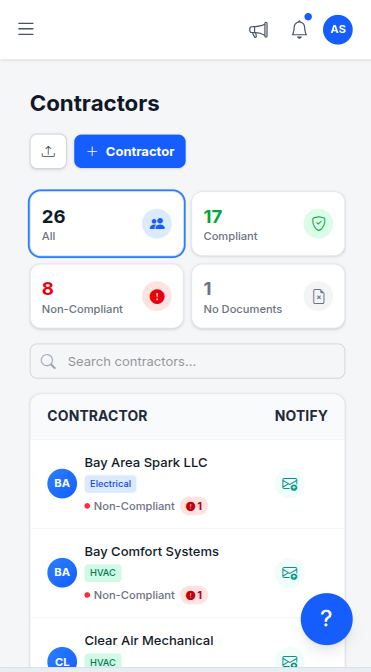
Certificate tracking from the request to every renewal
A tenant's certificate collected at lease signing is out of date a year later, and a ten-year lease outlives ten policy years. Tracking it is three steps, and only the first takes your time.
Send one link
Add the tenant, the janitorial company, the elevator contractor or the landscaper, and email them an upload link. There is no account to create and no portal to learn — most people finish from a phone in under two minutes, which is what gets a busy tenant's office manager to actually send it.
The certificate reads itself
The carrier, policy numbers, limits and the dates of every coverage line come off the ACORD 25 without anyone opening the PDF, and are checked against the minimums you set. A tenant short on general liability shows as short the moment the certificate arrives. See how AI COI parsing works.
Renewals are chased before they lapse
Every plan flags what is expiring on the dashboard and emails your team a weekly summary. Starter adds alerts at 90, 60, 30 and 7 days, sent to the tenant or vendor as well as to you — and their copy carries the same upload link, so the renewal comes back without a follow-up. How the alerts work.
Each building, its own bar
On Pro, every property carries its owner's and lender's requirements on top of your company default, and flags the tenants and vendors on it who fall short. Requirements by property.
A report for each owner
Pro exports the status of a property's tenants and vendors as a dated PDF or spreadsheet — for the owner, the asset manager or the lender's annual request. Track vendors by property.
Renewal dates on your calendar
Subscribe every policy renewal into Google Calendar, Outlook or Apple Calendar on Starter, next to the lease dates already there.
Tenants and vendors are two different rosters of risk
Both are on one roster and both use the same link. What differs is the document that sets the requirement, how long they are in the building, and what you need from them.
Tenants
Office, retail, restaurant and industrial occupiers. The lease's insurance exhibit sets the bar, for as long as the lease runs.
- ✓General liability at the lease's limits, renewed every policy year
- ✓The property LLC, the manager and the lender as additional insureds
- ✓Property and business income cover the lease requires, kept on file
- ✓Liquor liability for restaurants and bars, stored with the certificate
Vendors
Janitorial, HVAC, elevator, roofing, landscaping, security and parking contractors. The service agreement sets the bar, and the riskiest work is often the shortest job.
- ✓General liability, workers' comp, and auto where they drive on site
- ✓Additional insured endorsement naming the owner and the manager
- ✓W-9 before the first invoice is paid
- ✓A state trade license for licensed trades — checked against the state board where it publishes one
What to collect, and what happens to it
The required-documents checklist (Starter and up) lists what you ask of everyone; each tenant's and vendor's page then shows what is on file, what is expiring and what is still missing.
Certificate of insurance
Tenants and vendorsCommercial general liability at the limits the lease or the service agreement sets; workers' comp for anyone with employees on site; auto for vendors who drive onto the property.
Read automatically when uploaded — carrier, policy numbers, limits and each coverage's own dates. Minimums for general liability, auto, workers' comp and umbrella are checked against what you require.
Additional insured endorsement
Tenants and vendorsNaming the entity that owns the property — often its own LLC — plus the management company and, where the loan requires it, the lender. On the policy by endorsement, not typed into the certificate holder box.
Requirable on the checklist and answered by the endorsement page itself. Pro reads the endorsement forms off the upload — form number and the entities named on it.
Other lines the lease requires
TenantsProperty insurance on the tenant's improvements and contents, business income, liquor liability for a restaurant — whatever the lease's insurance exhibit lists.
Stored with the certificate and visible on the tenant's record. Only general liability, auto, workers' comp and umbrella are graded against a minimum; these lines are for someone to read.
Form W-9
Vendors you payNeeded for the 1099s each January, and easiest to collect before the first invoice.
Legal name, TIN and tax classification read off the form automatically, on every plan.
Trade license
Licensed tradesElectrical, HVAC, plumbing and roofing contractors working on the building.
Checked against the state licensing board where it publishes one, and re-checked daily — a suspension shows on the vendor's record without anyone looking it up.
Simple, transparent pricing
Priced by plan, not by property or by tenant. A single building's roster often fits the free plan; the required-documents checklist starts on Starter; per-property requirements and owner reports come with Pro.
Free
Free forever. No credit card. No expiration date on the free tier.
- ✓AI COI parsing and AI W-9 parsing — carrier, limits, policy dates, name, TIN and tax classification read for you
- ✓Any other document, filed by category — contracts, financials, licensing, insurance
- ✓License tracking in all 50 states, plus automated daily state-database verification
- ✓Magic link uploads — your subs send documents without an account
- ✓Expiration tracking across every license, certificate and W-9
- ✓Weekly compliance digest by email
- ✓Timestamped audit trail
Starter
Solo GC or property manager tired of chasing renewals manually — less than the cost of discovering one expired license on inspection day.
- ✓Everything in Free
- ✓Unlimited tenants and vendors — no 25-record ceiling
- ✓Automated email alerts at 90/60/30/7 days — sent to your team and the contractor
- ✓Calendar feed — subscribe every deadline into Google Calendar, Outlook or Apple Calendar
- ✓Bulk import — add your roster from CSV or a certificate archive
- ✓Invite a second user to your account
Pro
Multiple job sites or properties, with a foreman or office manager who also needs access.
- ✓Everything in Starter
- ✓AI-parsed endorsements — additional insured, waiver of subrogation, primary & non-contributory, read off the endorsement pages
- ✓Projects — group subs by job or property, with per-project coverage requirements
- ✓Unlimited users & team roles
- ✓Integrations — QuickBooks Online, Zapier, Make, Slack and Teams
- ✓Compliance reports (PDF & Excel)
No contracts. Cancel anytime. See the full plan comparison →
Where commercial real estate certificates usually go wrong
Most landlords collect certificates. The gaps are in which entity they name, and in what nobody re-checks after the lease is signed.
The wrong owner entity
Each building is often held by its own LLC, and that LLC — not the sponsor's brand or the management company alone — is the one the endorsement needs to name. A certificate naming the wrong entity can leave the owner outside the coverage the lease asked for.
Collected at signing, never again
The tenant's certificate goes in the lease file on day one. Policies renew every year of a multi-year lease, sometimes at lower limits or with a different carrier, and nothing tells the landlord unless someone asks.
Certificate holder is not additional insured
Being listed as certificate holder means you receive the certificate. Being additional insured, by endorsement, is what lets the owner claim under the tenant's or vendor's policy. The difference, explained.
The lender's requirements, forgotten
Loan documents often require the lender on tenant and vendor endorsements too, and ask for proof at each annual review. If the lender isn't in the property's requirements, it won't be on anyone's checklist.
Frequently asked questions
Can I track tenants and vendors in the same place?
Can each property have its own insurance requirements?
Does it check that the property's LLC is named as additional insured?
Does TrackMyVendor track lease expiration dates?
Does it integrate with Yardi, AppFolio or MRI?
How is it priced for a portfolio?
Do tenants or vendors need to create an account?
Know every tenant and vendor is covered, building by building
One link for every tenant and vendor, certificates read for you, and renewals chased before they lapse.
Start free — no credit cardFree for up to 25 tenants and vendors
Explore More
Vendor Insurance Tracking for Property Managers
Track vendor COIs, licenses & W-9s across every property
Track Vendors by Property
Each property's vendors, and a report for each owner
Compliance Rules for Property Managers
Management-company defaults, owner requirements per property
Track Vendor Insurance for Property Managers
COI tracking and vendor compliance guide for PMs
HOA Management
Compliance management for HOAs
AI COI Parsing
AI-powered certificate of insurance extraction
Alerts and Reminders
Get notified before documents expire
Compliance Status & Reports
Every contractor red or green at a glance, and dated PDF and Excel reports
Certificate Holder vs. Additional Insured
The endorsement distinction that decides who's protected in a claim
License Verification
Search 1M+ licenses and monitor your sub roster daily
Plans & Pricing
View plans and start your free trial