
Subcontractor Management — Every Sub's License, COI & W-9 in One Dashboard
TrackMyVendor gives every sub a magic upload link — no account, no portal login. AI reads their COI. Their license gets checked against the official state database. And when anything expires, your sub gets the renewal link before you have to ask.
No credit card required
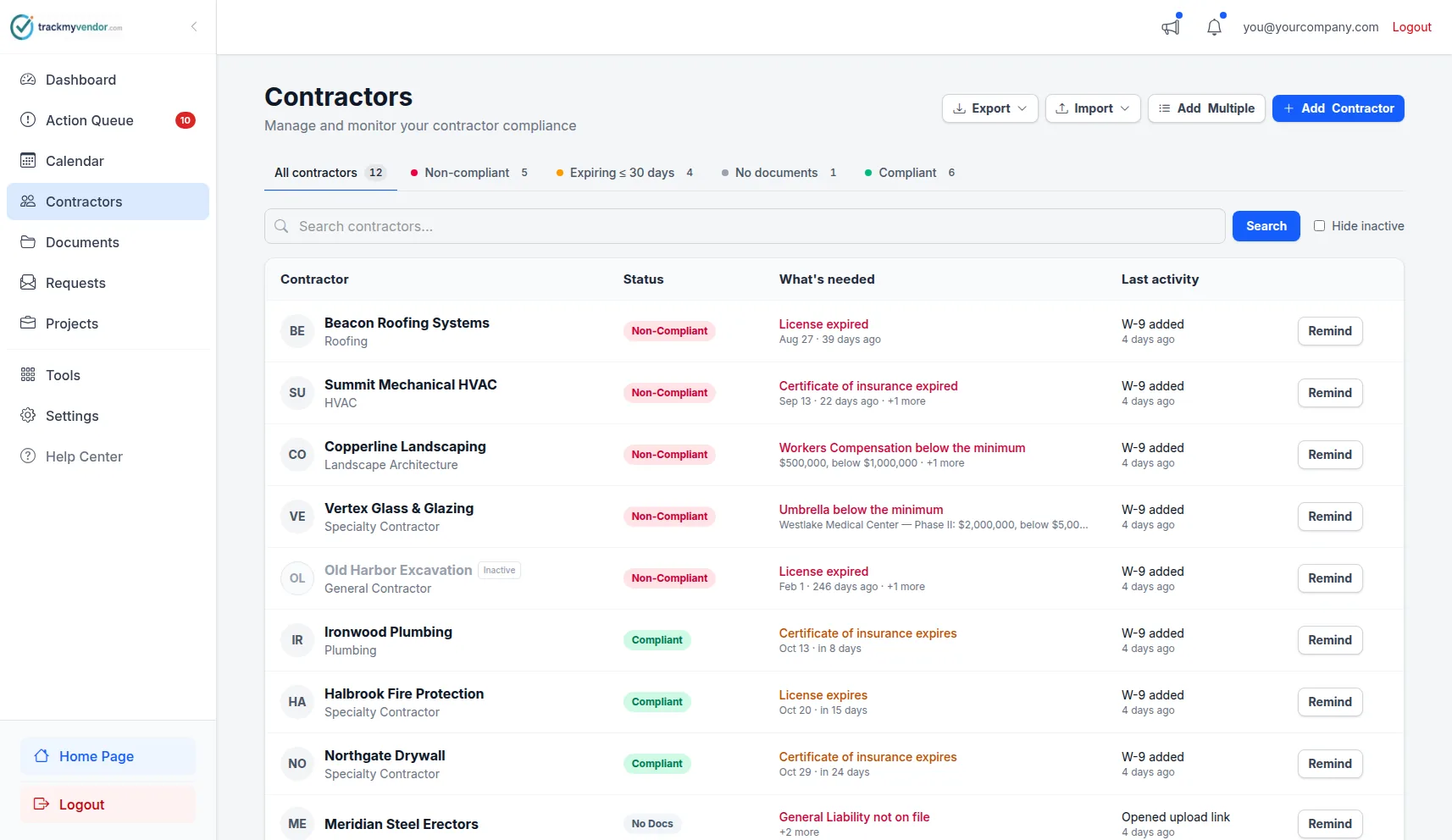
Every sub's license, COI, and W-9 status — one view
Sound familiar?
The way most GCs handle contractor risk management today doesn't work — spreadsheets and shared folders leave gaps that only show up at the worst moment.
How it works
From first sub added to first alert sent — set up in under 10 minutes.
Add your sub roster
Starter: bulk CSV importType a name and email, or import your full roster from a spreadsheet. That's all TrackMyVendor needs to get started.
Send a magic link — sub uploads in under 2 minutes
Magic linkTrackMyVendor emails the sub a one-time upload link. No account, no portal login, no app download on their end. They upload COI, W-9, and any other required documents from their phone.
AI reads the COI — no manual data entry
AI parsing · every planCoverage limits, policy types, and expiration dates are extracted from the uploaded PDF automatically. No mistyped dates. No manually opening PDFs.
License verified against the state database
TX · FL · CA · WA · OR · IL · CO · AZ · CT · AR · VA · OHWe query TX TDLR, FL DBPR, CA CSLB, WA L&I, OR BCD, IL IDFPR, or CO DORA directly to confirm the contractor's license is active. A clean COI and a suspended license can coexist. We catch that.
Alerts fire automatically — sub gets the renewal link
Starter+ · Auto alertsAt 90, 60, 30, and 7 days before any expiration, both you and your sub get an email — with a renewal upload link attached. Your sub updates their document without you having to ask.
Everything on one sub profile
Six things a spreadsheet and a shared folder can't do for you.
Complete sub profiles
COI on file, license verified, W-9 collected, overall compliance status — one profile per sub. You see what matters without hunting.
Magic link uploads
Send a one-time upload link. Sub submits COI and W-9 from their phone — no account, no portal, no chasing email threads.
Live license verification TX · FL · CA · WA · OR · IL · CO · AZ · CT · AR · VA · OH
State licensing databases checked in real time. We verify the contractor — not just the document. No other sub management tool does this.
Automated expiration alerts Starter+
90/60/30/7-day alerts to you and your sub — with a renewal upload link in every email. No manual follow-up.
AI COI parsing All plans
Automatically extracts expiration dates, coverage limits, and policy types from uploaded PDFs. No manual data entry, no misreads.
Compliance reports Pro
Export your full sub roster with compliance status as PDF or Excel — for audits, client submittals, or board meetings.
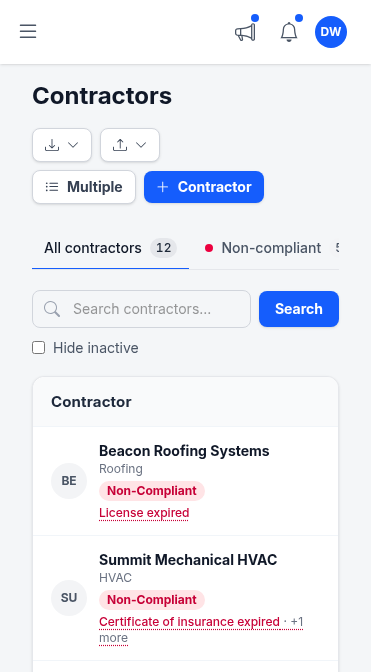
Every sub's status. From your phone. On the job site.
Green is compliant. Amber is expiring soon. Red means they shouldn't be on site. No folder-diving — the answer is one tap away, and the compliance calendar shows the same roster as a twelve-month renewal schedule.
- Mobile-optimized — no squinting at spreadsheet columns between calls
- Track multiple licenses per sub — plumbing, electrical, GC, and more under one profile
- Pull a compliance report instantly when your owner or broker asks
We verify the contractor, not just the document
Most sub management tools store documents. TrackMyVendor checks what's behind them.
| What matters on a job site | Spreadsheet / shared folder | TrackMyVendor |
|---|---|---|
| Is this sub's insurance current? | Only if someone checked this week | Expiration tracked, alerts fire automatically |
| Is this sub's state license still active? | No way to know without calling the state | Checked automatically against TX, FL, CA, WA, OR, IL, CO, AZ, CT, AR, VA & OH databases |
| Can the sub upload their own documents? | You email them and wait | One-time magic link — no account, uploaded in under 2 minutes |
| Does the sub get notified before their COI expires? | Only if you remember to email them | Both you and your sub at 90/60/30/7 days — renewal link included |
| Can you pull a compliance report in 30 seconds? | No — requires manual data assembly | One-click PDF or Excel export (Pro) |
What GCs are saying
"We used to find out a sub's insurance lapsed when our insurance broker asked during a renewal audit. Now I get a 30-day warning and my sub gets the same email automatically. We've got 6 active projects running right now — I'm not chasing anybody for paperwork."
Mike R. — General Contractor, Dallas TX
Managing 40 subs across 6 active job sites
Simple, transparent pricing
No contracts, no sales call. Start free — paid plans include a 30-day free trial.
Free
Organize your roster and run COI tracking at zero cost. Free forever, no credit card.
- ✓AI COI parsing & W-9 parsing — carriers, limits, dates and TINs read for you
- ✓50-state license tracking, plus automated license verification against state databases
- ✓Magic link onboarding — documents arrive through an upload link, no account needed
- ✓Document vault — contracts, licenses, W-9s and insurance, filed by category
- ✓Weekly compliance digest — a summary email of upcoming expirations
- ✓Timestamped audit trail — the full history of every certificate
- –Renewal reminders are sent by you — one click emails the upload link
Pay as you go
Hands-free automation for a small roster, without a flat monthly fee. 30-day free trial, no credit card.
- ✓Everything in Free
- ✓Automated renewal reminders — email alerts at 90/60/30/7 days to your team and the subcontractor
- ✓Projects & job sites — group subcontractors by job, with per-project coverage rules
- ✓Calendar feed — deadlines live in Google Calendar, Outlook or Apple Calendar
- ✓Bulk roster import — from a CSV or a certificate archive
- ✓Billed monthly for the most you tracked at once — only subcontractors with a document or license on file count, and inactive ones cost $0
Starter
Flat, predictable pricing for active general contractors and property managers.
- ✓Everything in Pay as you go
- ✓Unlimited subcontractors — no per-record fees and no 40-record ceiling
- ✓Predictable monthly bill — one fixed price as your roster grows
- ✓2 user seats — invite a second team member or coordinator
Pro
Full automation, endorsement checks and integrations for growing teams.
- ✓Everything in Starter
- ✓AI endorsement verification — reads the additional insured, waiver of subrogation and primary & non-contributory pages
- ✓Unlimited users & roles — access for foremen, office managers and admins
- ✓QuickBooks & integrations — QuickBooks Online, the API, Zapier, Make, Slack and Teams
- ✓Insurance audit report — every sub's coverage and gaps over your policy year, for the premium audit
- ✓Third-party categories — vendors, tenants, renters and franchisees on their own lists
No contracts. Cancel anytime. See the full plan comparison →
Frequently asked questions
How do my subs upload their documents?
Does TrackMyVendor verify licenses, or just store them?
Are expiration alerts sent to my sub, or just to me?
Does the AI actually read the COI, or do I still enter dates manually?
How many subcontractors can I track?
Can I export compliance reports for audits or client submittals?
Can I get started today without a sales call?
Get your first 25 subs running in under 10 minutes
No sales call. No implementation project. Free forever for up to 25 subcontractors.
Start free — no credit card requiredExplore More
License Verification
Search 1M+ licenses and monitor your sub roster daily
COI Tracking Software
Collect, read and track every certificate of insurance
AI COI Parsing
Reads dates, limits and carriers from every certificate
Contractor Onboarding Software
Onboard subcontractors without the back-and-forth
Alerts and Reminders
Get notified before documents expire
Project Management
Group vendors by project or job
Document Storage
Manage all compliance documents securely
General Contractor Compliance Software
Subcontractor compliance software for GCs — licenses, COIs & W-9s
Vendor Insurance Tracking for Property Managers
Track vendor COIs, licenses & W-9s across every property
Plans & Pricing
View plans and start your free trial