
Compliance Calendar for Insurance Expiration Tracking and Vendor Renewal Reminders
See every COI insurance expiration date, contractor license renewal, and W-9 deadline across your sub roster on one calendar — then subscribe it to Google Calendar, Outlook or Apple Calendar so those dates sit beside your own. Built-in vendor renewal tracking and automated subcontractor renewal reminders, color-coded by urgency, zero spreadsheet required.
Compliance calendar on all plans, including Free · No credit card required
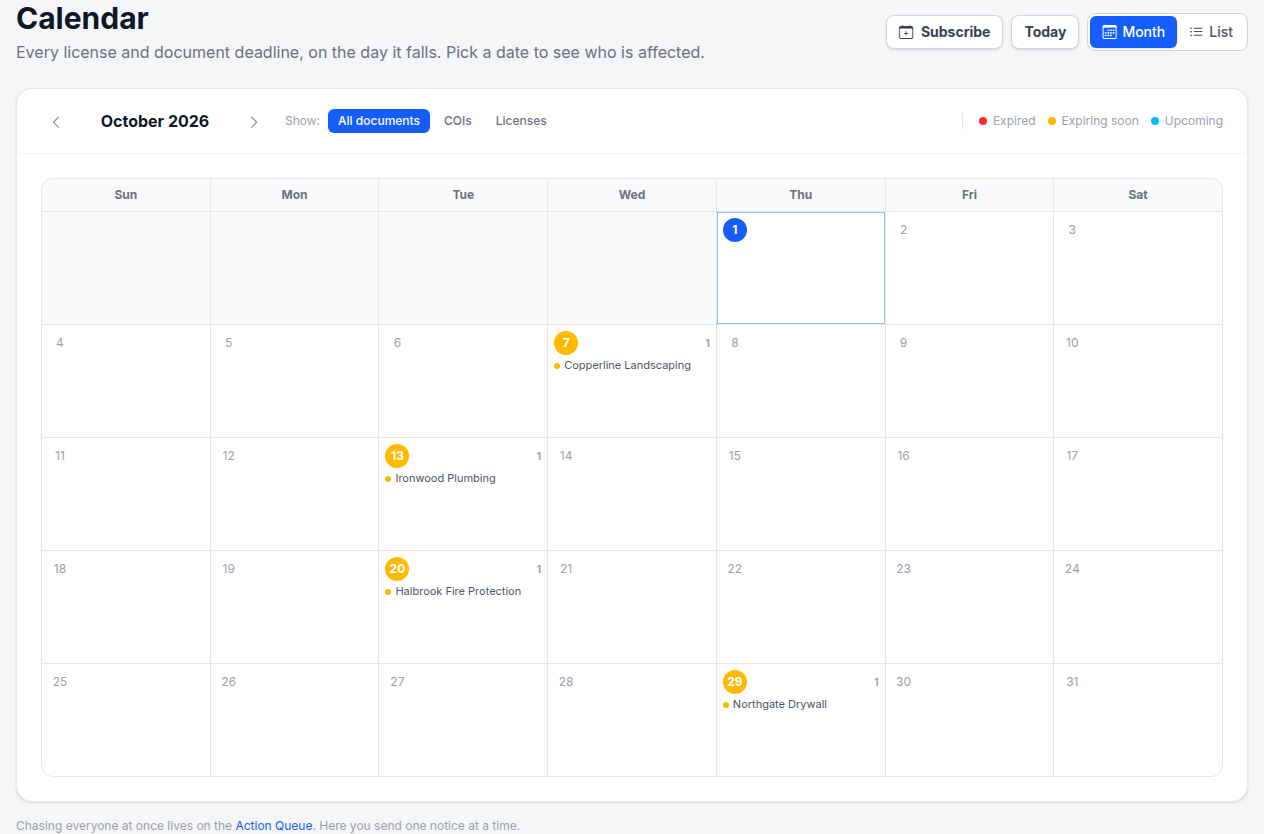
Every deadline on the day it falls — and one click to subscribe
Insurance expiration tracking shouldn't be a spreadsheet job
Manual vendor renewal tracking in a spreadsheet means you're always one missed column away from a lapsed COI or suspended license on an active job.
Managing vendors for properties or an HOA?
The calendar works the same with vendors in place of subs: every certificate, license and W-9 date for the vendors servicing a property or an association. For an HOA it is the vendor half of the association's compliance calendar — the board's governance dates stay in its own. See HOA contractor compliance or vendor tracking for property managers.
How the compliance calendar works
Zero setup beyond adding your subs. The calendar populates automatically from every tracked expiration date in your account.
Month view — the shape of the month
Open Calendar in the sidebar. Every date with a tracked expiration carries a color-coded marker: red for expired, amber for expiring within 30 days, sky blue for upcoming. Dates without deadlines stay quiet, so a busy week is obvious at a glance.
Filter by document type
Use the filter pills — All documents, COIs, Licenses — to narrow the view. Filtering to COIs shows only insurance expiration dates across your roster; Licenses shows only contractor license renewals. The calendar re-colors instantly, and the filter stays in the URL so you can bookmark the view you actually use.
Click a date — see who's expiring, and chase them
Clicking a date opens the day, listing every sub with a deadline on it — their name, document type, and status. Each entry links through to that sub's profile, and you can send a renewal notice with an upload link from the day itself, without going anywhere else.
Or read it as a list
The List toggle shows the same month in date order instead of a grid — each row carrying the sub, the document, the insurer and policy number, and how many days are left. The grid answers "how is this month shaped"; the list answers "what is next". Both are a click apart and the choice stays in the URL.
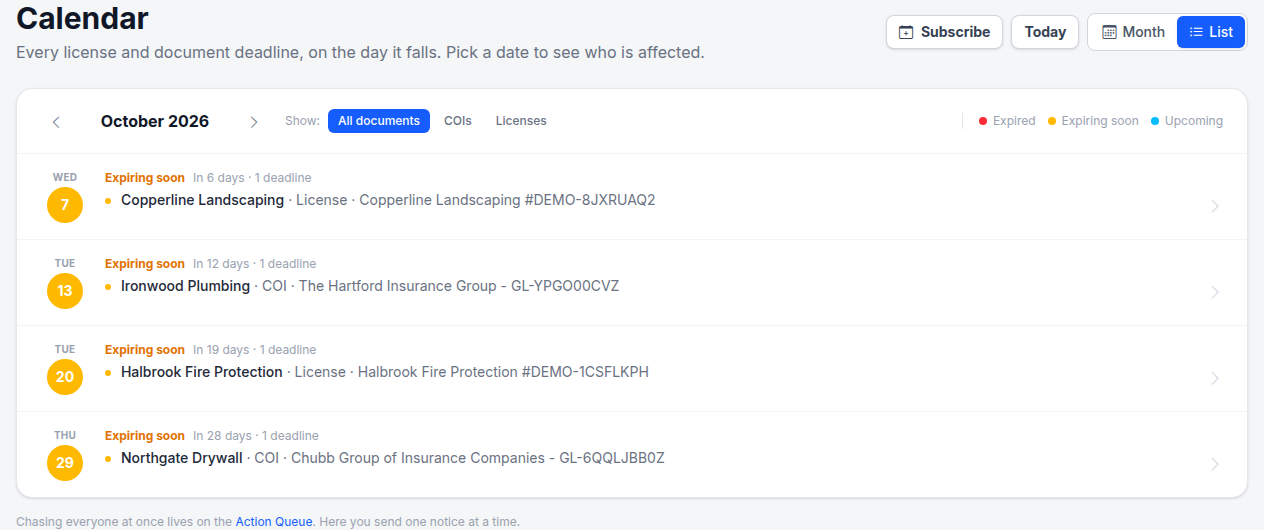
List view — the same month in date order, with the insurer and policy number on each row
Subscribe it to Google Calendar, Outlook or Apple Calendar
The calendar you check every morning is probably not ours. So don't make anyone remember to open a second one: hit Subscribe and every COI expiration, license renewal and W-9 deadline lands in the calendar your team already lives in.
It's a subscription, not an export. Your calendar app re-fetches the feed on its own schedule, so a certificate a sub uploads today turns up in Outlook without anyone doing anything — and a renewal you record removes the deadline that was there. Deadlines arrive as all-day entries, so they never block out a meeting slot.
- ✓ One click for Apple Calendar and Outlook; paste the URL into Google Calendar under Other calendars → From URL.
- ✓ Share it with a superintendent or a PM who will never log in — no account needed to read it.
- ✓ Shared too widely? An owner generates a new link, and every old copy stops working at once.
Step-by-step: Subscribe to your deadlines in Google, Outlook or Apple Calendar.
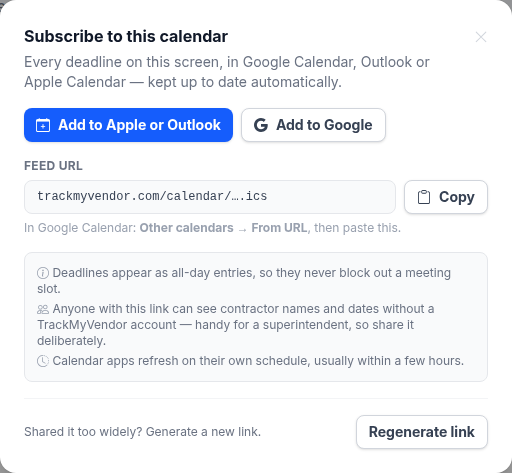
One link, added once — then it keeps itself up to date
Insurance expiration tracking, vendor renewal tracking, and subcontractor renewal reminders — all in one place
Every document type your subs carry — tracked, color-coded, and actionable from a single compliance calendar.
Insurance expiration tracking for COIs and policies
Every COI on file — whether AI-extracted or manually entered — has an expiration date that lands on the compliance calendar. Insurance expiration tracking is automatic: a lapsing policy shows as amber the month it expires, and red the day it does. Filter the calendar to COI to see your full insurance expiration landscape for the year at a glance — which months are heavy with renewals, which subs have overlapping policy end dates, and who is already past due.
Spot renewal clusters
See at a glance when 3–4 COIs all expire the same week — before it becomes a chase.
Policy type detail
Click any date to see which subs, which policies (GL, WC), and their expiration status.
Already expired — visible immediately
Expired COIs stay on the calendar in red so nothing silently disappears from view.
Vendor renewal tracking — licenses, COIs, and every document your subs carry
Vendor renewal tracking in TrackMyVendor goes beyond a single document type. Contractor and subcontractor licenses verified directly from state databases — Texas TDLR, Florida DBPR, California CSLB, Washington L&I, Oregon CCB, Illinois IDFPR, and Colorado DORA — sync their renewal dates to the calendar automatically. Manually entered licenses for any other state work the same way. See the full vendor renewal schedule across your entire roster: which months have license renewals due, which subs have both a COI and a license expiring at the same time, and which are already suspended or past due.
State-verified dates
TX · FL · CA · WA · OR · IL · CO license expiration dates pulled directly from state databases.
Any state, manually entered
Subs in other states? Enter the date manually and it gets the same calendar treatment.
Overlap view
See when a sub has both a license and a COI expiring in the same month — before it's a scheduling problem.
Subcontractor renewal reminders
Starter+The calendar shows you what's coming. Automated renewal reminders make sure it gets handled without you following up. On Starter and Pro plans, TrackMyVendor sends expiration alerts at 90, 60, 30, and 7 days before any tracked expiration — to you and to the sub. The sub's alert includes a one-time upload link so they can submit the renewed document from their phone without you sending a separate email. The calendar and the alerts work together: you see the deadline in the calendar, the reminder system handles the follow-through.
You and your sub get the alert
Most tools only notify the GC. TrackMyVendor emails the sub at the same time with a renewal link — no follow-up required from you.
90 · 60 · 30 · 7 days
Four warning points before every expiration. Enough lead time to act — not just enough to notice.
W-9s and other documents with expiration dates
Any document uploaded to TrackMyVendor with an expiration date on file appears on the compliance calendar — including W-9s, bonds, specialty certifications, and custom uploaded documents. If you track a date, it lands on the calendar. Nothing lives only in an email thread or a spreadsheet column while everything else is on the calendar.
What GCs and property managers say
"Before, I kept expiration dates in a spreadsheet and hoped I'd catch them before they lapsed. Now I open the calendar and see the whole year — what's coming up in June, which subs have both a license and a COI expiring in the same month. It's the first thing I check on Monday morning."
James T. — General Contractor, Houston TX
Managing 28 subs across residential and commercial jobs
Simple, transparent pricing
The compliance calendar is included on all plans. Per-deadline renewal alerts and the subscribable calendar feed start on Starter.
Free
Organize your roster and run COI tracking at zero cost. Free forever, no credit card.
- ✓AI COI parsing & W-9 parsing — carriers, limits, dates and TINs read for you
- ✓50-state license tracking, plus automated license verification against state databases
- ✓Magic link onboarding — documents arrive through an upload link, no account needed
- ✓Document vault — contracts, licenses, W-9s and insurance, filed by category
- ✓Weekly compliance digest — a summary email of upcoming expirations
- ✓Timestamped audit trail — the full history of every certificate
- –Renewal reminders are sent by you — one click emails the upload link
Pay as you go
Hands-free automation for a small roster, without a flat monthly fee. 30-day free trial, no credit card.
- ✓Everything in Free
- ✓Automated renewal reminders — email alerts at 90/60/30/7 days to your team and the subcontractor
- ✓Projects & job sites — group subcontractors by job, with per-project coverage rules
- ✓Calendar feed — deadlines live in Google Calendar, Outlook or Apple Calendar
- ✓Bulk roster import — from a CSV or a certificate archive
- ✓Billed monthly for the most you tracked at once — only subcontractors with a document or license on file count, and inactive ones cost $0
Starter
Flat, predictable pricing for active general contractors and property managers.
- ✓Everything in Pay as you go
- ✓Unlimited subcontractors — no per-record fees and no 40-record ceiling
- ✓Predictable monthly bill — one fixed price as your roster grows
- ✓2 user seats — invite a second team member or coordinator
Pro
Full automation, endorsement checks and integrations for growing teams.
- ✓Everything in Starter
- ✓AI endorsement verification — reads the additional insured, waiver of subrogation and primary & non-contributory pages
- ✓Unlimited users & roles — access for foremen, office managers and admins
- ✓QuickBooks & integrations — QuickBooks Online, the API, Zapier, Make, Slack and Teams
- ✓Insurance audit report — every sub's coverage and gaps over your policy year, for the premium audit
- ✓Third-party categories — vendors, tenants, renters and franchisees on their own lists
No contracts. Cancel anytime. See the full plan comparison →
Frequently asked questions
What types of expiration dates appear on the compliance calendar?
Is the compliance calendar available on the free plan?
Can I filter the calendar by document type?
How do I see which sub is expiring on a specific date?
How does the calendar handle COI insurance expiration tracking specifically?
What is vendor renewal tracking?
Can I subscribe to the compliance calendar from Google Calendar or Outlook?
Who can see my calendar subscription link?
How do subcontractor renewal reminders work?
Compliance calendar, insurance expiration tracking, and vendor renewal reminders — in one place
Every COI, license, and W-9 renewal date — color-coded, subscribable from Google Calendar, Outlook or Apple Calendar, and chased automatically. Free for up to 25 subs.
Start free — no credit card requiredFree plan · Up to 25 subcontractors · No credit card required
Explore More
Alerts and Reminders
Get notified before documents expire
Subcontractor Management Software
Every sub's license, COI and W-9 in one dashboard
License Verification
Search 1M+ licenses and monitor your sub roster daily
AI COI Parsing
Reads dates, limits and carriers from every certificate
Compliance Status & Reports
Every contractor red or green at a glance, and dated PDF and Excel reports
Document Storage
Manage all compliance documents securely
Project Management
Group vendors by project or job
How to Track Subcontractor Insurance
COI management guide for general contractors
How to Track Subcontractor Insurance & Compliance
COIs, licences and W-9s across the whole roster
Plans & Pricing
View plans and start your free trial