
Some contractors will never carry a coverage you require, and nothing is wrong. A sole trader who works from a van they don't own won't have Auto Liability. A one-person operation in most states isn't required to carry Workers' Compensation on themselves.
Without a waiver you have two bad options: drop the requirement for your whole roster, or leave that contractor permanently Non-Compliant for something you were never going to insist on. A waiver is the third: excuse this contractor from this coverage, and leave the requirement standing for everyone else.
What a waiver applies to
It applies to the contractor, not to a certificate. That matters: it survives their next renewal, so you grant it once rather than re-granting it every time a new COI arrives. It also holds on per-project requirements — raising the limits on one job doesn't give the contractor a vehicle.
Turn waivers on
They're off until you switch them on, and there are two conditions, not one.
-
Open Settings → Compliance
Settings → the Compliance tab.
Enforce coverage requirements must already be ticked. A waiver excuses a requirement, so with enforcement off there's nothing to excuse and no Waive button appears anywhere. The page says so if you switch waivers on without it.
-
Allow waivers
Under Coverage Waivers, tick Allow coverage requirements to be waived.
-
Set the policy
Who may waive — Owners only, or any member. Owners only to start with; a waiver makes a contractor compliant without any paperwork changing, which is not a decision to hand to everyone by default.
Require a reason — on unless you turn it off. The reason is what makes the decision readable a year later, by someone who wasn't in the room.
Waivers expire after — blank for no expiry, or a number of days to force a periodic review. It's stamped on each waiver when granted, so shortening it later won't retroactively expire decisions already made.
-
Save
Save waiver settings.
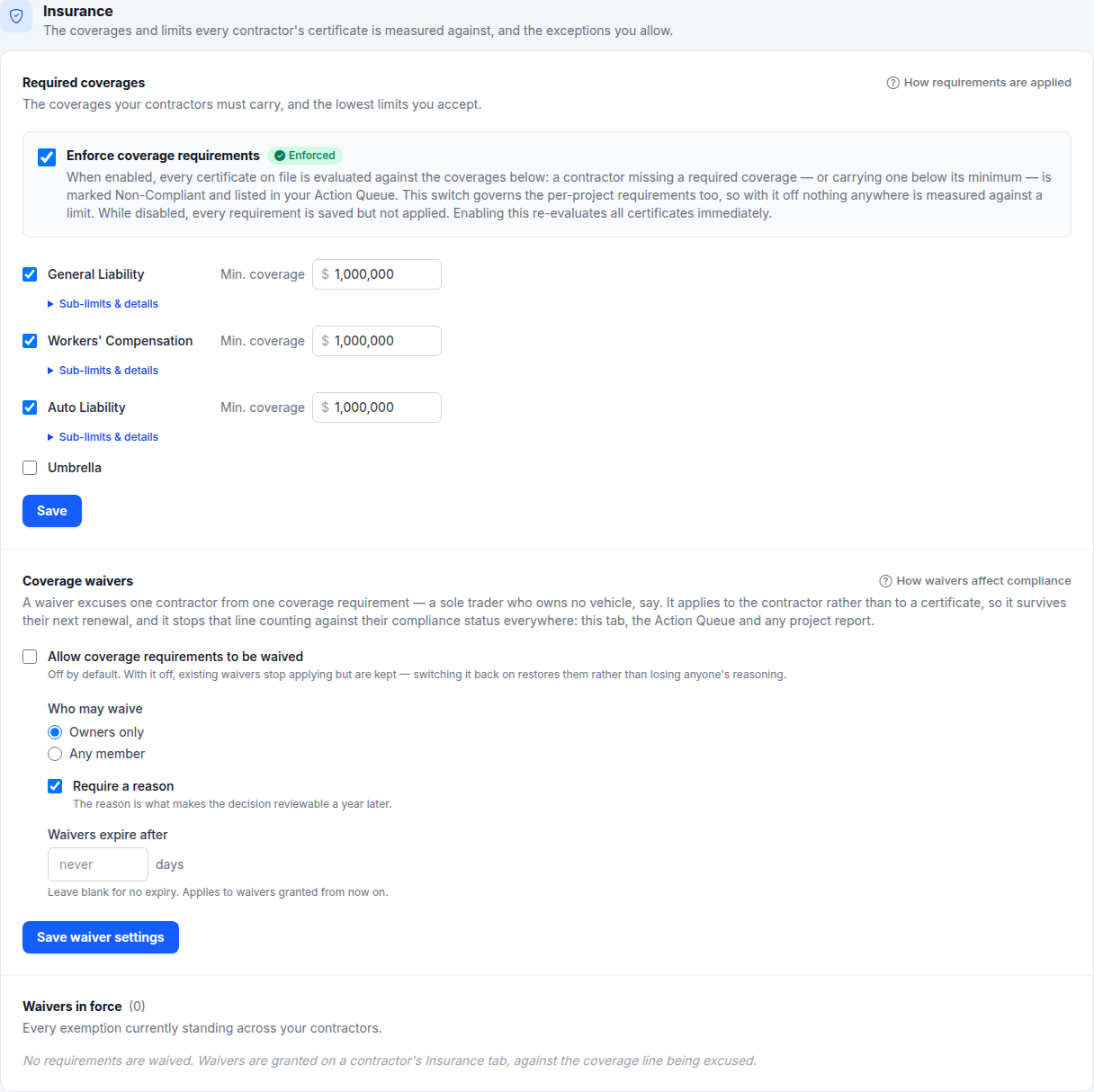
- 1 Off until you switch it on
- 2 Who may grant one, and whether a reason is required
- 3 Every waiver standing across your roster
Waive a coverage for one contractor
-
Open the contractor's Insurance tab
Open the contractor and go to the Insurance tab.
-
Press Waive on the line
In the coverage table at the top, find the line you want to excuse and press Waive.
-
Say why
Give a reason — “Sole trader, owns no vehicles” is the shape of it. Write it for whoever reads it after an incident, not for yourself today.
-
Grant it
Waive requirement. The line turns to Waived straight away and the contractor's badge is recalculated.
No Waive button on the line?
It only appears where there is something to waive. Three reasons it isn't there:
- The line is already met. Nothing to excuse on a coverage that's in date and at your limit. Waivers are for lines that are currently short — missing, expired, below your minimum, or not yet in force.
- You require nothing on that line. An unticked coverage is never checked, so it's never short.
- You're not allowed to. If Who may waive is set to Owners only and you're a member, you'll see the line but not the button.
Note
What a waiver changes
The waived line stops counting against the contractor everywhere at once:
- Their compliance badge is calculated without it.
- It drops out of the Action Queue, including when the coverage on file lapses.
- Renewal reminders stop asking them for it — both the automatic ones and the Action Queue's emails.
- It's excluded from project compliance — Projects are called Assignments unless you've renamed them on Settings → Appearance — and from the reports you export.
What it does not do is hide anything. The line stays on the coverage table marked Waived, with the reason, who granted it and when, and any certificate you hold for it is still on file.
Remove a waiver
Press Remove waiver on the line. The requirement applies again immediately, and if the contractor is short you'll see it in the Action Queue on the next pass.
Removing doesn't erase it. The record of who granted it, why, and for how long is kept — that's the point of writing it down, and it's the question you'll be asked if something happens on a job they worked.
See every waiver you've granted
Settings → Compliance → Waivers in force lists every exemption standing across your roster, with the contractor, the coverage, the reason, who granted it and when it expires.
Read it occasionally. A standing exemption granted for a good reason in March is the kind of thing that's still in place two years later for no reason at all, and the register is the only place it's visible as a set rather than one contractor at a time.
Careful
What happens next
The contractor's compliance status is recalculated the moment you grant or remove a waiver — there's no overnight job to wait for.
The waiver is written to the contractor's Activity tab, so the change is dated and attributed alongside everything else that has happened to them.
If a waiver has an expiry, it simply stops applying on that date. Nothing emails you about it, so the requirement reappears on that contractor quietly — the Waivers in force register is where to see what is due to lapse.