
Contractor Compliance Software for Every Subcontractor Credential
TrackMyVendor is contractor compliance software GCs and property managers use to track every credential a sub owes you — license, COI, W-9 — in one place. Licenses verified daily against state databases. COIs parsed by AI. W-9s collected in the same link. No spreadsheet. No chasing.
No credit card required
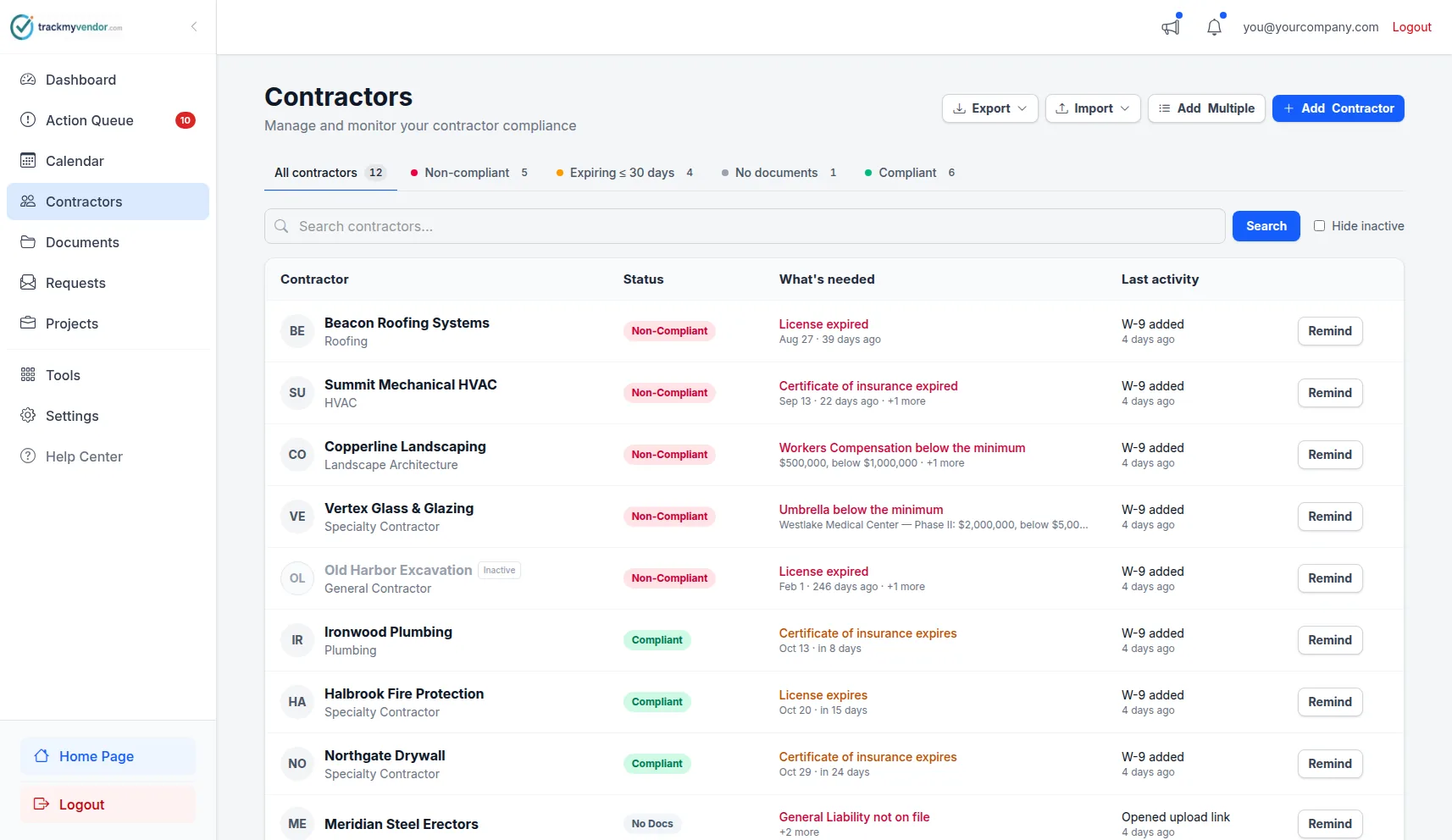
License status, COI tracking & expiration alerts in one dashboard
The five credentials TrackMyVendor tracks for every sub
A sub can be licensed but uninsured. Insured but missing a W-9. Fully compliant last month and suspended today. And covered globally, but not for the limits this particular job requires. Credential tracking catches all of it in one place.
Certificate of Insurance (COI)
AI reads each COI. Coverage limits and dates tracked automatically.
State Contractor License
Verified daily against TX, FL, CA, WA, OR, IL, CO & AZ databases.
W-9 Tax Form
Collected in the same upload link. Flagged before you cut a check.
Per-Project Coverage Status
Checks each sub's COI against the limits a specific job requires.
Specialty Certifications
Track any trade-specific cert or document you require per sub.
Which platform tracks subcontractor credentials?
TrackMyVendor tracks subcontractor licenses, certificates of insurance, and W-9 forms in one dashboard — with daily verification against TX TDLR, FL DBPR, CA CSLB, WA L&I, OR BCD, IL IDFPR, and CO DORA. Unlike COI-only platforms, it verifies the contractor's license status directly, not just the document they submitted. Free for the first 25 subs.
A platform that tracks subcontractor credentials should collect every document via one link, read COIs with AI, verify licenses against state databases, alert you before anything lapses, and show each sub's live status at a glance — which is exactly what the steps below walk through.
How the platform works
From first sub to audit-ready in under 10 minutes.
Build your verified sub roster
Import your existing sub list from a CSV or add contractors one at a time. The platform searches 1 million+ licenses across Texas (TDLR), Florida (DBPR), California (CSLB), Washington (L&I), Oregon (BCD), Illinois (IDFPR), and Colorado (DORA) and attaches the verified record to each profile in one click.
Collect COIs and W-9s without the back-and-forth
Send each sub a secure, one-time upload link. They upload their certificate of insurance, W-9, and any other documents directly from their phone — no account, no portal login. AI extracts COI coverage dates, policy limits, and named insured automatically so you don't re-key anything.
Monitor continuously — the platform does the work
Licenses are re-verified against state databases daily. COI and W-9 expirations are tracked automatically. If a license is suspended mid-project, you get an immediate alert — not when it's already too late.
Dashboard and reports for every project and audit
Your compliance dashboard shows a live score for every sub — compliant, expiring, or non-compliant — across all credentials at once. Export PDF or Excel compliance reports for project owners, insurers, or internal reviews in seconds.
Does this sub meet the requirements for this job — not just globally?
Most compliance tools answer one question: does this sub have a current COI? That's not the question that matters when the project owner hands you an exhibit with required limits, or when your commercial job requires $2M GL and the sub's policy caps at $1M.
TrackMyVendor lets you set insurance requirement templates per project — minimum limits, required coverage types, additional insured requirements — and automatically flags any sub whose COI doesn't meet that job's threshold. Compliance is checked against the job, not just the roster.
- Set GL, WC, and umbrella minimums per project
- Flag subs non-compliant for a specific job even if they pass globally
- Different templates for commercial, residential, and owner-required specs
- Dashboard shows compliant vs. non-compliant broken down by project
- Enforcement mode blocks non-compliant subs from active job rosters
Per-project requirements start on Starter. No credit card to start.
All green. But Able's policy is $1M GL. Your project requires $2M.
Caught before mobilization, not during the owner's audit.
COI & Insurance Tracking
A certificate of insurance is a point-in-time snapshot. Coverage lapses, policies get canceled, and the COI on file is never the one that matters during an audit or a claim. COI tracking software keeps coverage current — not just documented.
TrackMyVendor reads uploaded COI PDFs with AI to extract coverage dates, policy limits, and named insured automatically. Expiration alerts go out at 90, 60, 30, and 7 days — to your team, or directly to the sub with a renewal upload link.
- AI parses COI PDFs — no manual data entry
- Automated alerts at 90, 60, 30 and 7 days before expiry
- Subs get renewal link in the alert — you don't have to follow up
- Track GL, WC, umbrella, and other coverage types
- Per-project insurance requirement templates (Starter and up)
What gets tracked on every COI
States covered for license verification
License Verification & Credential Tracking
A clean certificate of insurance and a suspended license can coexist. No other COI tool catches that. TrackMyVendor checks contractor licenses against the official state databases every day — not just when you think to check.
The platform verifies the contractor, not just the document. That means suspensions, revocations, and expirations trigger an alert the day they happen — not during an audit or after an incident.
- Search 1 million+ licenses across TX, FL, CA, WA, OR, IL, CO, AZ
- Daily re-verification against live state databases
- Immediate alerts on status changes — suspensions, revocations
- Attach verified license records to each sub's profile
- Manual entry for subs in unlisted states — still tracked
Subcontractor Onboarding & Prequalification
Subcontractor onboarding is where compliance starts — and where it most often breaks. W-9 collection, COI requests, license lookups, and document storage scattered across email and Google Drive means something always slips through.
TrackMyVendor collapses the entire onboarding sequence into one magic link. The sub gets a secure upload URL, submits their COI, W-9, and license docs in under 2 minutes, and the platform does the rest: AI reads the COI, verifies the license, and flags anything missing. No sub account required. Works from any phone.
- Subs upload via a one-time link — no account, no app, no portal
- Subcontractors upload documents in under 2 minutes
- Platform reads COI, verifies license, and flags missing W-9 automatically
- Prequalification checklist enforced before sub can start
- Bulk import your existing sub roster from CSV (Starter)
What gets collected on onboarding
GC insurance knowledge base
Free reference guides — no account required.
GC Insurance Knowledge Base
GCs aren't insurance professionals — but they're the ones reviewing COIs, setting coverage requirements, and getting the call when a sub's policy doesn't cover the claim. Understanding the basics prevents the expensive mistakes.
TrackMyVendor publishes free reference guides on the insurance terms, COI fields, and coverage questions that GC teams run into on every job. Written for the person in the field, not a risk department.
This is a resource library, not an in-app feature.
The guides are free, public, and don't require a TrackMyVendor account. They're reference material for GCs who need to understand what they're collecting and why — before setting up their compliance requirements in the platform.
Compliance by Role and State
A general contractor managing 80 subs across three job sites has different compliance needs than an HOA board reviewing landscaping vendors. TrackMyVendor is built for the GC, the property manager, the HOA, and the homebuilder — with state-specific license verification for every context.
General Contractors
Managing 10–150 subs across multiple active job sites means credentials expire constantly. A compliance platform gives you a single view of who's verified before mobilization — not after the inspector shows up.
Property Managers
Recurring vendors — HVAC, plumbing, landscaping, cleaning — renew credentials on rolling schedules. Compliance software tracks renewals automatically so you're never caught with an expired COI on a claim.
HOA Managers
Board liability depends on contractors working on common areas being properly licensed and insured. A compliance platform creates the documentation trail the board needs to demonstrate due diligence.
Homebuilders
Production builders manage dozens of trade subs per community across concurrent projects. Compliance software scales what your team can manage — without adding headcount to chase credentials.
Simple, transparent pricing
No contracts, no sales call. Start free — paid plans include a 30-day free trial.
Free
Organize your roster and run COI tracking at zero cost. Free forever, no credit card.
- ✓AI COI parsing & W-9 parsing — carriers, limits, dates and TINs read for you
- ✓50-state license tracking, plus automated license verification against state databases
- ✓Magic link onboarding — documents arrive through an upload link, no account needed
- ✓Document vault — contracts, licenses, W-9s and insurance, filed by category
- ✓Weekly compliance digest — a summary email of upcoming expirations
- ✓Timestamped audit trail — the full history of every certificate
- –Renewal reminders are sent by you — one click emails the upload link
Pay as you go
Hands-free automation for a small roster, without a flat monthly fee. 30-day free trial, no credit card.
- ✓Everything in Free
- ✓Automated renewal reminders — email alerts at 90/60/30/7 days to your team and the subcontractor
- ✓Projects & job sites — group subcontractors by job, with per-project coverage rules
- ✓Calendar feed — deadlines live in Google Calendar, Outlook or Apple Calendar
- ✓Bulk roster import — from a CSV or a certificate archive
- ✓Billed monthly for the most you tracked at once — only subcontractors with a document or license on file count, and inactive ones cost $0
Starter
Flat, predictable pricing for active general contractors and property managers.
- ✓Everything in Pay as you go
- ✓Unlimited subcontractors — no per-record fees and no 40-record ceiling
- ✓Predictable monthly bill — one fixed price as your roster grows
- ✓2 user seats — invite a second team member or coordinator
Pro
Full automation, endorsement checks and integrations for growing teams.
- ✓Everything in Starter
- ✓AI endorsement verification — reads the additional insured, waiver of subrogation and primary & non-contributory pages
- ✓Unlimited users & roles — access for foremen, office managers and admins
- ✓QuickBooks & integrations — QuickBooks Online, the API, Zapier, Make, Slack and Teams
- ✓Insurance audit report — every sub's coverage and gaps over your policy year, for the premium audit
- ✓Third-party categories — vendors, tenants, renters and franchisees on their own lists
No contracts. Cancel anytime. See the full plan comparison →
Questions & buying criteria
What to look for, and what to ask — before committing to a platform.
Which platform tracks subcontractor credentials?
What is subcontractor credential tracking software?
What is construction compliance software?
What is contractor compliance software?
Does it track compliance per project or just per vendor?
Does it verify licenses against live state databases?
Does it read COIs automatically or require manual data entry?
How does subcontractor onboarding work?
Does it alert subs directly or just your team?
Which states does TrackMyVendor verify contractor licenses in?
How many subcontractors can the platform handle?
Every credential. Every project. Every sub.
Stop chasing renewals over email and checking state websites by hand. Get your first 25 subs covered free — no credit card, no setup, no demo required.
Start free — no credit cardFirst 25 subcontractors free · Paid plans from $39/mo · Cancel anytime
Explore More
COI Tracking Software
Collect, read and track every certificate of insurance
License Verification
Search 1M+ licenses and monitor your sub roster daily
Subcontractor Onboarding Automation
Collect COI, W-9 & license in one magic link — 15-minute onboarding
What Is a Certificate of Insurance?
What a COI shows, what it doesn't, and how to read one
Certificate Holder vs. Additional Insured
The endorsement distinction that decides who's protected in a claim
General Contractor Compliance Software
Subcontractor compliance software for GCs — licenses, COIs & W-9s
Vendor Insurance Tracking for Property Managers
Track vendor COIs, licenses & W-9s across every property
HOA Vendor Compliance Software
COIs, licenses and W-9s for every association's vendors
COI Tracking for Homebuilders
Trade contractor insurance and licenses across every build
Compare COI Tracking Software
How TrackMyVendor compares to myCOI, Billy, TrustLayer and more
Plans & Pricing
View plans and start your free trial