
Contractor Onboarding Software: Collect COI, License & W-9 in One Magic Link
Send a magic link from any sub's profile. They complete their onboarding by uploading their COI, license, W-9, and safety records in under 2 minutes — directly into your compliance dashboard. Onboarding subcontractors has never been this fast.
Free for your first 25 subs · No credit card required
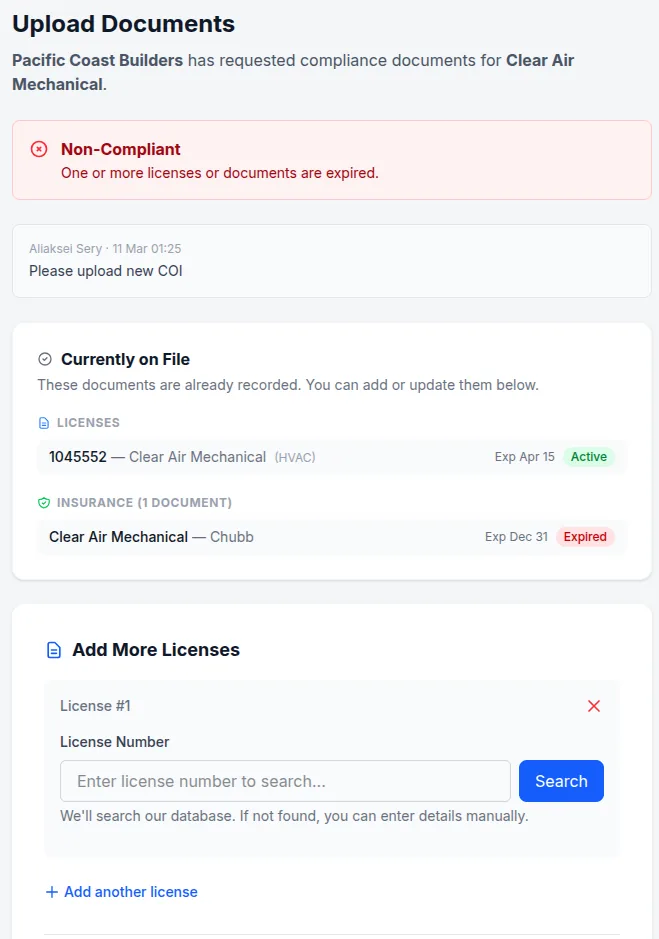
This is what your sub sees during onboarding. No account needed. They upload. You're done.
How contractor onboarding works
Three steps. No implementation. Onboarding subcontractors works the same day you sign up.
Send an onboarding request
From any sub's profile, click "Request Documents" to send a secure magic link via email. Specify exactly which documents you need — COI, license, W-9, or all three.
Sub completes onboarding — no account, no app, no portal login
FreeThe sub clicks the link, sees what's already on file, and uploads whatever's missing — from their phone or desktop. They can look up and attach their professional license directly from our database of 1 million+ records. Most subs complete onboarding in under 2 minutes.
Onboarding documents appear in your dashboard — already filed
AI parsing on Starter+Uploaded documents are attached to the sub's profile automatically. On Starter and above, COIs are parsed by AI — expiration dates and coverage limits are extracted without any manual data entry. No renaming files, no chasing follow-ups.
Everything covered in one onboarding link
One link collects every document you need from a sub during contractor onboarding — no back-and-forth required.
COI collection at onboarding
Sub uploads their certificate of insurance. On Starter+, AI reads the PDF and extracts expiration dates, coverage limits, and policy types automatically.
License lookup & attach
Sub can search our database of 1 million+ professional licenses and attach theirs directly — no PDF hunt required. We verify it's active with the state in real time.
W-9 collection Starter+
Collect W-9s through the same onboarding link — no separate request needed. Everything stored in the sub's profile and ready at year-end.
Re-onboarding renewal reminders Starter+
When a COI approaches expiration, your sub gets an alert with a fresh upload link included — so you never have to follow up manually. Alerts fire at 90, 60, 30, and 7 days.
Any document type
Safety certifications, signed agreements, background check results — subs can upload any compliance document during onboarding. All stored in their profile.
Per-project requirements Pro
Set minimum GL and workers' comp limits per project. TrackMyVendor flags any upload that doesn't meet the requirement — so you catch coverage gaps before a job starts.
Why onboarding subcontractors is broken today
Most GCs spend 3–5 hours a week on document follow-up that should take minutes.
Without TrackMyVendor
With TrackMyVendor
Simple, transparent pricing
Contractor onboarding links are free forever. Automation and AI parsing unlock on paid plans.
Free
Free forever. No credit card. Start onboarding subcontractors today.
- ✓Magic link contractor onboarding — no sub account needed
- ✓License verification — TX, FL, CA, WA & OR
- ✓Expiration tracking (in-app reminders)
- ✓Document storage
Starter
Solo GC or property manager ready to automate renewals and stop chasing.
- ✓Everything in Free
- ✓AI COI parsing — no manual data entry
- ✓Automated alerts (90/60/30/7 days) with upload link
- ✓W-9 collection & storage
- ✓Compliance reports (PDF & Excel)
Pro
GC office with multiple job sites or a foreman who also needs access.
- ✓Everything in Starter
- ✓Per-project insurance requirement templates
- ✓Compliance enforcement (flag non-compliant subs per project)
- ✓Team roles & permissions
- ✓Bulk import — add your roster from CSV
- ✓Timestamped audit trail
No contracts. Cancel anytime. See the full plan comparison →
Contractor onboarding — frequently asked questions
Does the subcontractor need to create an account or download anything to complete onboarding?
Will my subs actually complete onboarding, or will they ignore the link?
What documents can subcontractors upload during onboarding?
Can I require specific coverage limits during contractor onboarding?
Does contractor onboarding work for collecting W-9s too?
How long does the onboarding link stay active?
What if a sub doesn't respond to the onboarding request?
What documents should I collect from a subcontractor before they start?
Start onboarding subcontractors today — no setup required.
Free for your first 25 subs. No credit card, no implementation call, no onboarding meeting.
Start free — onboard your first sub todayNo credit card required
Explore More
Vendor Management
Organize all your contractors in one place
Document Storage
Manage all compliance documents securely
AI COI Parsing
AI-powered certificate of insurance extraction
Alerts and Reminders
Get notified before documents expire
COI Tracking Software
Software for collecting and tracking COIs
General Contractor Compliance Software
Subcontractor compliance software for GCs — licenses, COIs & W-9s
Plans & Pricing
View plans and start your free trial